Hosting

Load Test Your Store: 7 Essential Checks for a Safe Rehearsal

A promotion can create a rapid traffic increase, but the shape and bottleneck depend on the store. A controlled load test provides evidence about defined scenarios and conditions; it cannot guarantee that every future traffic pattern or external service will behave the same way.
This guide shows how to load test your store: why it matters, which tools to use, how to design realistic scenarios, how to read the results, and how to fix bottlenecks in time.
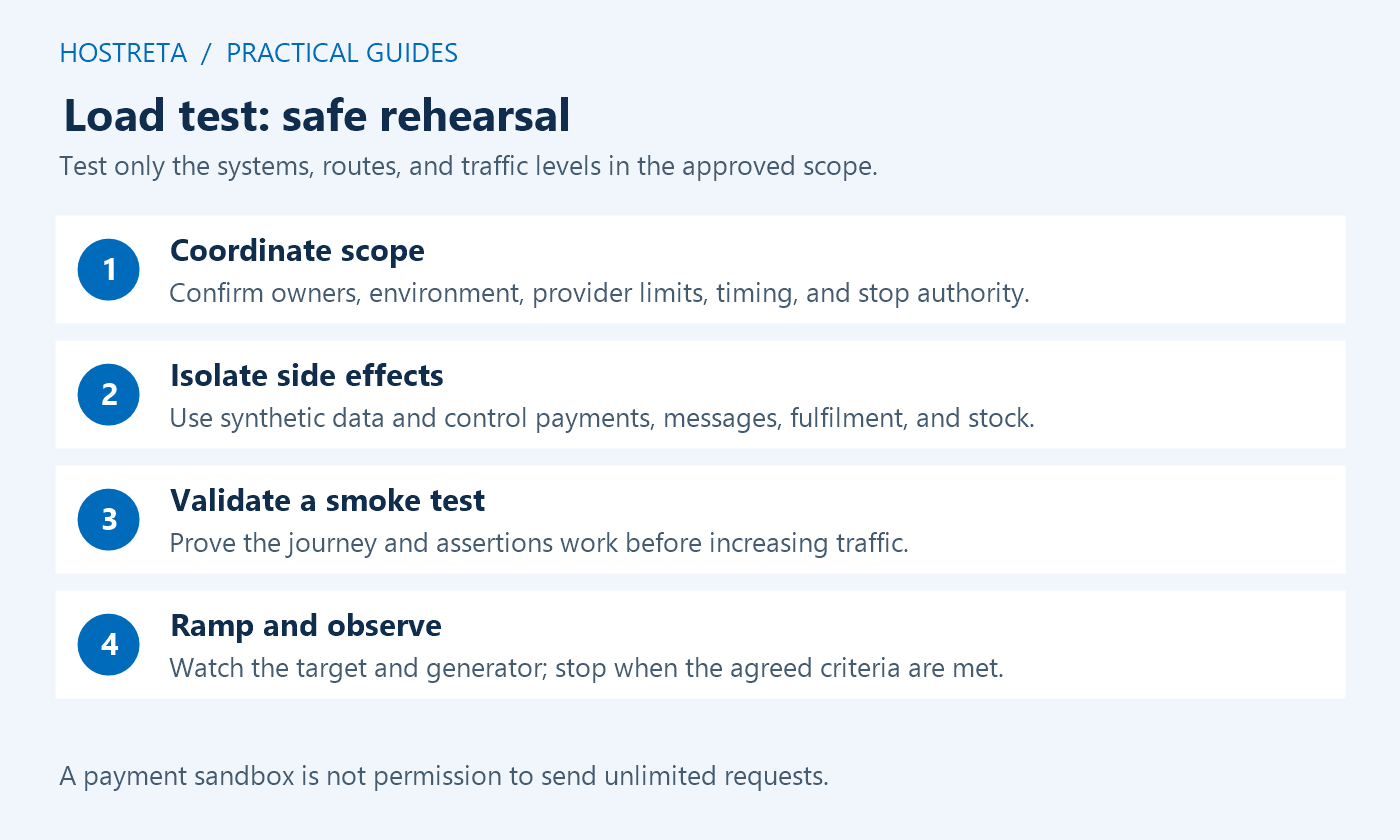
Tell your host before you test. A sudden flood of requests can look like an attack and get your IP blocked.
Test against a staging copy that matches production where possible, with synthetic data and controlled integrations. A staging label alone does not prevent real emails, payments, webhooks, or inventory updates.
Don’t just hammer the homepage — it’s probably cached and will look great.
Base your target on last year’s peak plus a margin for growth.
A load test should answer a precise question about a system you are authorized to evaluate. Define the target, scenarios, traffic model, duration, success criteria, and stopping conditions before generating traffic. Coordinate with the hosting operator so the test stays within an agreed scope and does not disrupt other services.
This article is a planning guide and does not launch requests against your store. Keep tests controlled and use a suitable environment. Do not direct load toward payment gateways, email providers, shipping services, or other third-party systems without their explicit supported testing arrangement.
List the domains, endpoints, environment, time window, and maximum planned workload. A load test on a shared host can affect neighboring accounts or trigger protections, so confirm the provider’s supported policy and operational contact. Ownership of the application does not automatically authorize pressure on every connected service.
Assign an operator who can stop traffic and an observer who can inspect the target. Record escalation and recovery steps. Keep real customer journeys outside the rehearsal unless a production test has been deliberately scoped and approved by the responsible operators.
Use synthetic accounts, products, and orders, and verify the environment’s integration settings. A load test can trigger real work through mail APIs, webhooks, inventory synchronization, or a live payment configuration even when the target URL says staging. Test those controls at low volume before increasing load.
Use supported sandbox behavior or appropriate stubs for external dependencies. Payment sandbox access does not necessarily grant permission to load test the provider. Separate your application’s capacity test from a small authorized functional check of the gateway integration.
Base the scenario mix on available evidence and expected promotion behavior. A load test should include the requests that matter: browsing, search, cart changes, account actions, or checkout according to the site’s requirements. Keep any assumed ratios explicit so reviewers can assess their relevance.
Use independent sessions and realistic data variation. Reusing one cart or account for every virtual user can create artificial contention or incorrect state. Include appropriate pauses and request dependencies rather than sending disconnected calls that never reproduce a valid application journey.
Start with minimal traffic and confirm that each step reaches its intended result. A load test script can receive a successful HTTP status while showing a login page, an empty cart, or a validation error. Check meaningful response content and state, not just response codes.
Grafana’s performance testing guidance recommends validating scenario logic before larger workloads. Correct the script first; scaling an invalid scenario only produces a larger collection of misleading measurements.
Set service expectations for important operations, error levels, and required business outcomes. A load test should have thresholds tied to the store’s needs rather than an arbitrary universal response-time target. Distinguish a product-page request from checkout completion and inspect their distributions separately.
Set stopping conditions for unexpected errors, private-data exposure, uncontrolled external effects, or unacceptable target health. k6 documents thresholds for pass and fail criteria. Configure the operational stop procedure as well; a graph becoming red is not useful if nobody can stop the generator.
Record response times, failures, throughput, completed journeys, and relevant server evidence. A load test needs target visibility so a slow request can be connected to application errors, database work, resource limits, or external waiting. Keep clocks and time zones aligned.
Watch the load generator too. A machine unable to produce the intended traffic can make the target look healthy under less load than planned. Record achieved workload, dropped work where relevant, and tool constraints rather than reporting only the configuration you requested.
Keep scenario, configuration, data, environment, and version records with the result. A load test supports conclusions about those conditions. It does not establish a universal maximum visitor count or guarantee a future sale when traffic patterns, code, or dependencies differ.
Choose a specific correction from evidence, repeat the relevant checks, and compare under consistent conditions. Confirm functional behavior after optimization. Preserve unresolved questions and assign an owner rather than declaring success because one average latency number improved.
| Test | Question | Planning concern |
|---|---|---|
| Smoke | Does the scenario work correctly at minimal traffic? | Validate assertions and side effects first |
| Expected-load | Does the system meet its requirements at the planned workload? | Use realistic journeys and thresholds |
| Stress | How does behavior change above normal demand? | Agreed ceilings, observation, and stopping conditions |
| Spike | How does it respond to a rapid change? | Recovery and protection behavior |
| Soak | Does prolonged work reveal degradation? | Storage, queues, resource trends, and test duration |
A load test plan can use more than one type, but begin with correctness and a meaningful baseline. Do not jump directly to a breaking-point exercise when the script or environment has not passed a small controlled rehearsal.
A fixed number of virtual users and a fixed rate of arriving work model different conditions. If users wait for responses, slower responses can reduce the rate of new work. A load test report should state which model was used and what traffic was actually achieved.
Do not translate virtual users directly into monthly visitors. Think time, request count, session behavior, cache state, and operation cost affect the relationship. Keep the capacity statement tied to a scenario such as a number of valid browsing journeys per interval under stated conditions.
Use the model that answers the business question and the tool’s supported configuration. Record assumptions about pauses, retries, data selection, and completed iterations. These details can explain large differences between two apparently similar runs.
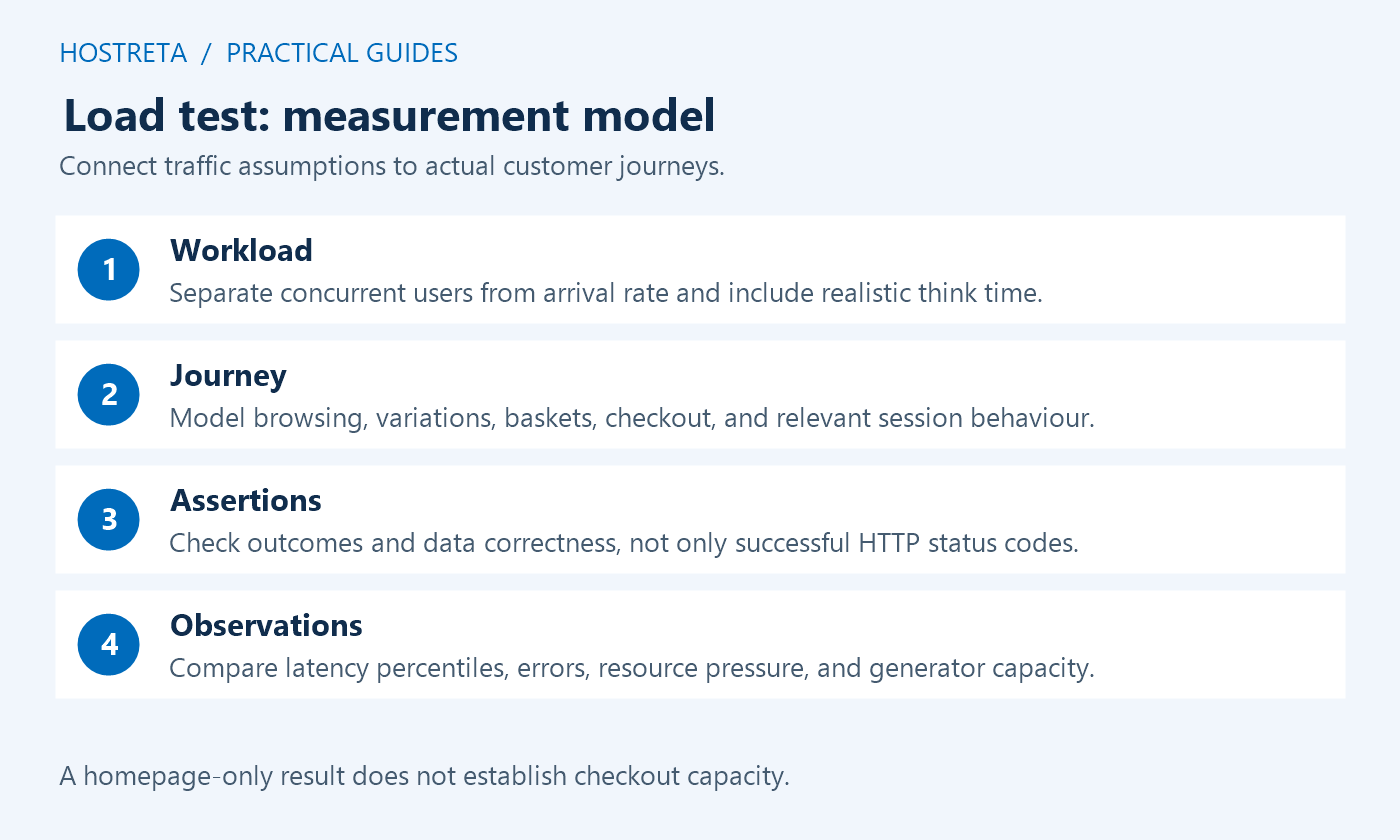
Test cart creation, item identity, quantity, totals, required fields, and the intended final test state. A checkout load test that never carries a valid session into the next request can mostly measure rejected operations rather than shopping capacity.
WooCommerce documents test orders and staging use. Apply the supported payment test method and prevent real charges or notifications. Keep provider-specific limits and permissions separate from the store’s own test scope.
Use synthetic records that can be identified and cleaned up deliberately. Record the expected number of completed test operations and reconcile it afterward. Unexpected duplicate orders or missing state are correctness failures even when response times remain low.
Compare staging with production for PHP, database, caching, resources, plugins, data volume, and relevant service configuration. A smaller staging plan can expose problems but cannot prove the production tier has the same limit. A different cache setup can produce a misleadingly fast or slow result.
State those differences in the load test report. Sanitized data should preserve the structure and scale relevant to the question without retaining unnecessary personal information. If an external dependency is stubbed, the result covers the application under that assumption rather than the real service’s behavior.
Keep final functional checks in the release process. A rehearsal before a plugin update does not establish that the updated production environment remains equivalent. Revalidate important assumptions after material changes.
The 95th percentile describes a point in the observed distribution; it does not mean every request meets that time. Look at the important operation separately and include failure counts. An overall percentile dominated by fast static requests can hide a slow checkout path.
Classify failures using response bodies, application logs, and hosting evidence. A 500 can come from a code error, while a blocked request can come from security controls rather than application saturation. A load test should preserve those distinctions instead of labeling every non-success as a capacity limit.
Record the observation window and sample volume. Short or small runs can miss intermittent behavior, but longer tests also require a justified scope and operating plan. Choose duration from the question and available safe environment, not a generic number copied from a demo.
Separate warm-cache browsing from uncached and personalized requests. A load test that repeatedly fetches one cached homepage can show excellent throughput without exercising the database or checkout. Conversely, forcing every request to miss can describe a different workload from normal public demand.
Use a representative set of products, categories, and queries. Keep cache exclusions and session rules correct rather than disabling privacy protections for a better score. Check how a purge or preload affects resource use if that event is part of the promotion plan.
Do not assume object caching fixes every repeated query. Use application evidence to identify what work is reusable and test freshness after changes. Performance improvements must preserve the required data and user separation.
Align the onset of degradation with target observations. Investigate CPU, memory, concurrency, database time, disk activity, network waiting, and application errors as relevant. A load test can narrow the search but still needs a reasoned explanation of which work causes the slowdown.
Change one significant variable at a time where practical. An upgrade, cache change, and plugin removal applied together can improve a run without revealing why. Keep functional acceptance checks so a removed feature is not mistaken for a successful optimization.
When asking the host for help, provide the agreed scope, exact time window, achieved workload, failures, and sanitized evidence. Ask which resource or service condition was observed and how the proposed correction addresses it.
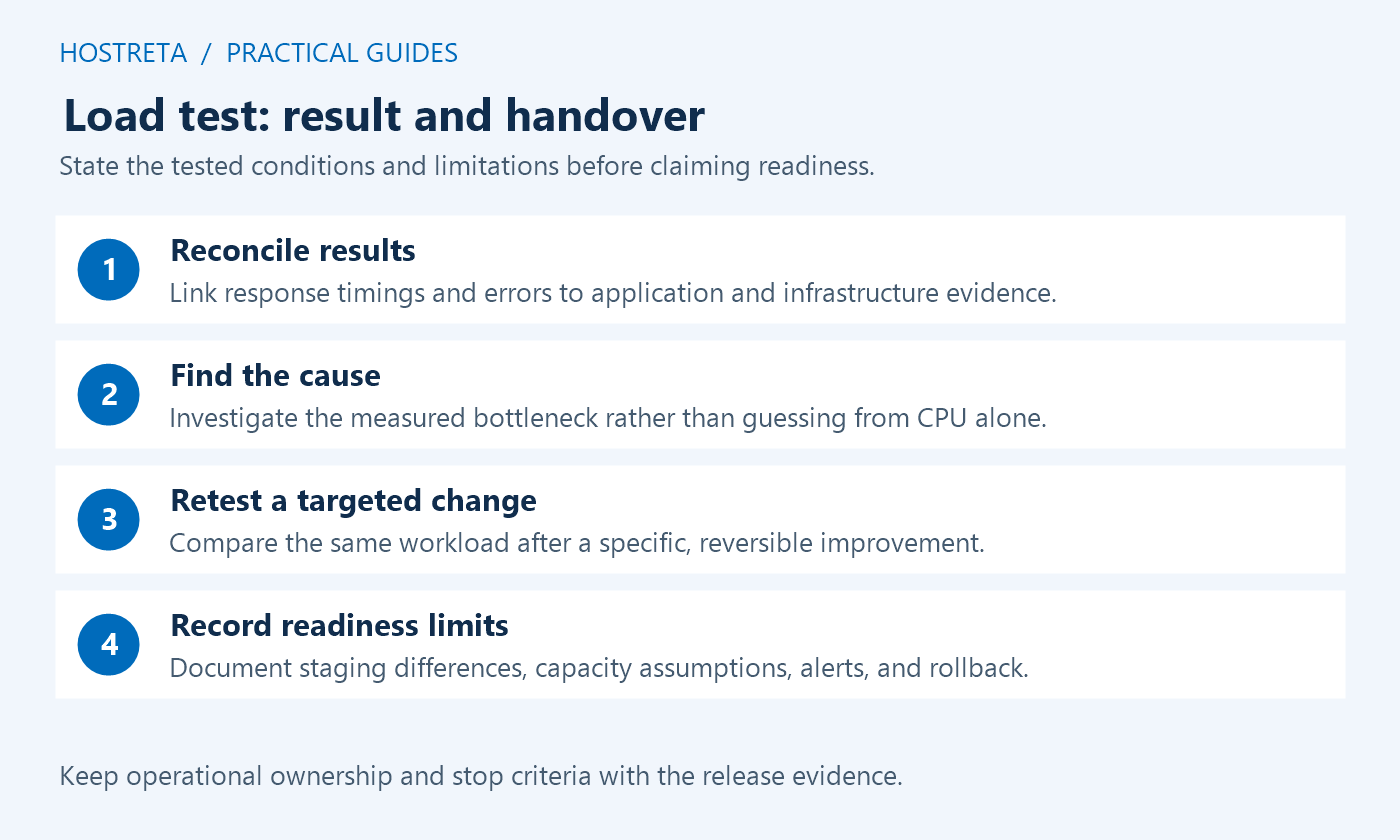
Use the findings to prepare monitoring, staffing, backups, release timing, and incident response. A load test is one input to readiness, alongside functional testing and external-service plans. Keep a known working version and avoid unnecessary late changes before a major promotion.
Define who can pause a campaign, disable a problematic optional feature, or contact the host. Make recovery steps reviewable and preserve recent order data. An old full-database restore can lose legitimate transactions, so keep file recovery and data recovery distinct.
Record remaining risks explicitly. If the payment provider, shipping integration, or peak traffic mix was outside scope, state that limit. An honest bounded conclusion is more useful than promising that the store can never fail.
If you need help designing the scenario or interpreting hosting evidence, KAWEDMA offers website development and hosting services. Provide the authorized target, expected workload, critical journeys, external-service constraints, and acceptance criteria.
Request a controlled rehearsal, a report with achieved traffic and environment assumptions, and a practical correction plan. A load test should produce evidence the owner can assess, not only a dramatic graph or an unsupported maximum-user claim.
Use an agreed scope with the responsible site and hosting operators. Shared infrastructure and connected services can be affected. Prefer a suitable controlled environment and establish limits, observation, and stopping procedures before generating traffic.
No. A cached public page and a session-dependent checkout exercise different paths. Test the relevant journeys with valid state and meaningful assertions, and report their results separately.
No such assumption is justified. Follow the provider’s supported testing policy and obtain any necessary authorization. Isolate external systems from the application’s load rehearsal unless their inclusion is explicitly supported.
The defined load test meets its functional and performance criteria under recorded conditions, critical gaps have owners, and monitoring and recovery are prepared. Keep the result’s limits visible and recheck after material changes.
Keep the final report with the release notes so future maintainers can understand and repeat the accepted workload.
We may earn a commission on purchases made through these links, at no extra cost to you.
Don’t miss the chance to participate in the biggest giveaway of this year.