HowTo

WooCommerce Settings: 7 Essential Checks for a Safe Holiday Sale
Peak season punishes small oversights. A wrong tax rate, a shipping zone that doesn’t cover half your customers, or an order email that never arrives turns a great sale into a support nightmare. A structured review of WooCommerce settings can reveal avoidable problems before the campaign; no fixed review duration guarantees readiness.
Work through these five areas before the rush begins.
Bulk changes are faster with the tools in How to Bulk Edit Posts and Products in WordPress.
Tax rules vary by country and change over time; if you’re unsure, check with an accountant. Make sure every shipping method you offer is tested with a real address.
Clear policies reduce support tickets and build confidence — see How to Build Trust Signals on Your Website.
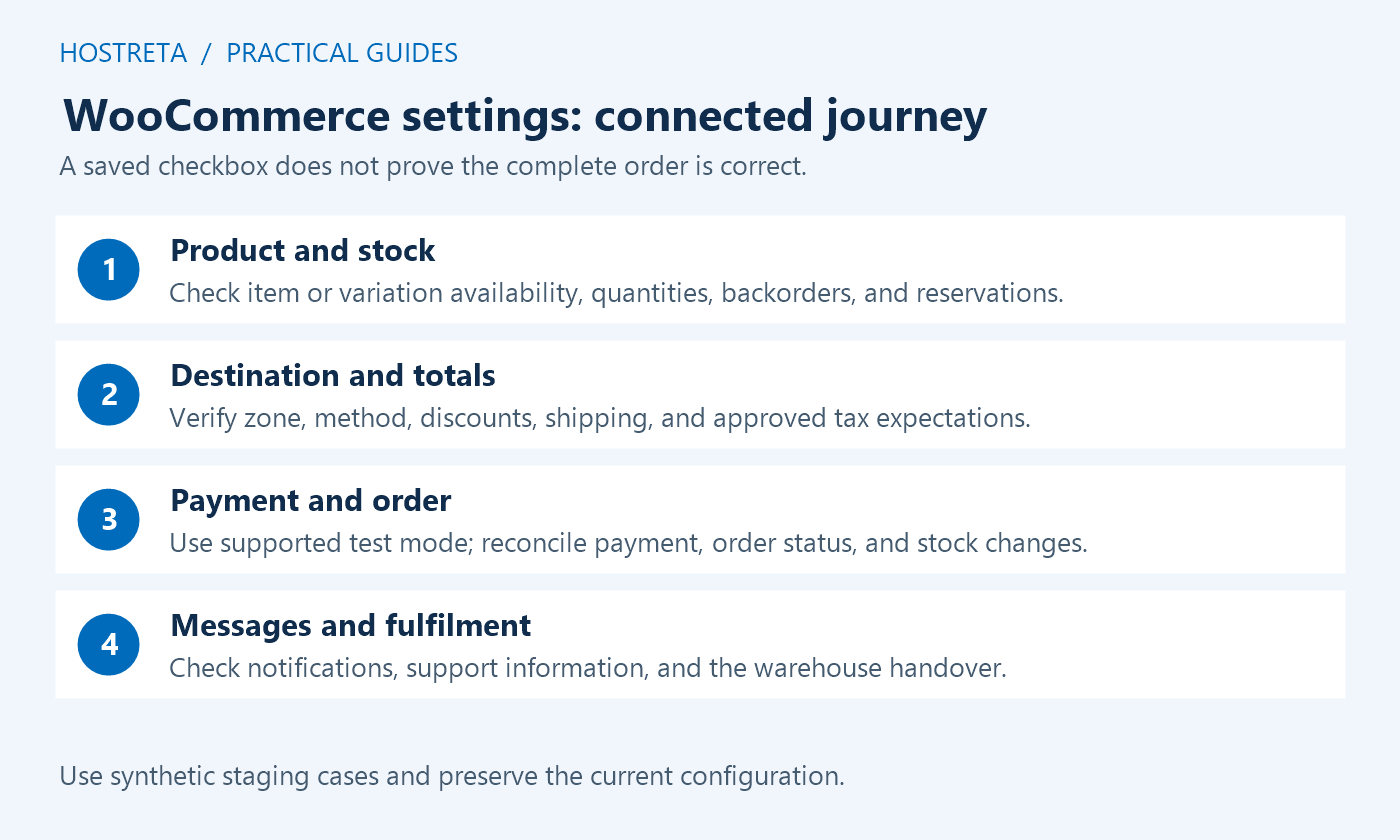
WooCommerce settings need to be reviewed as a connected customer journey. Product availability, shipping, taxes, payment, order state, and notifications interact. A checkbox that looks correct in administration is not enough to establish that a shopper can complete an accurate order.
Start on staging with synthetic products, customers, and orders. Keep the current configuration and a recovery plan before changing production. This guide describes technical verification, not tax advice or an instruction to process a real payment.
List selling regions, shipping destinations, currency, product types, account policy, payment methods, and campaign dates. WooCommerce settings should implement approved business rules rather than create them accidentally. Confirm who owns each decision and which external services depend on it.
Keep exceptions visible: remote locations, virtual products, restricted items, subscriptions, or products with special delivery requirements. A test using one ordinary address and one simple product may miss the cases that create support problems during a promotion.
Check global stock management and the relevant product or variation settings. WooCommerce settings can be overridden or supplemented at product level. Confirm quantities, stock status, backorder policy, notification recipients, and the behavior after a synthetic order changes stock.
The product settings documentation explains that the hold-stock setting concerns Pending payment orders rather than every unpaid state such as On hold. Review the actual payment and order flow before choosing a reservation interval.
Build an address matrix covering supported regions, boundaries, and known exceptions. WooCommerce settings should return the intended shipping method and cost for the actual product mix. Confirm zone ordering, postcode patterns, shipping classes, and any free-shipping condition through real-shaped synthetic addresses.
Do not assume every unsupported address should behave identically. A virtual-only order differs from a physical shipment. Check the actual cart contents, destination, and enabled methods, then make any unavailable-delivery message clear enough for the customer to act on.
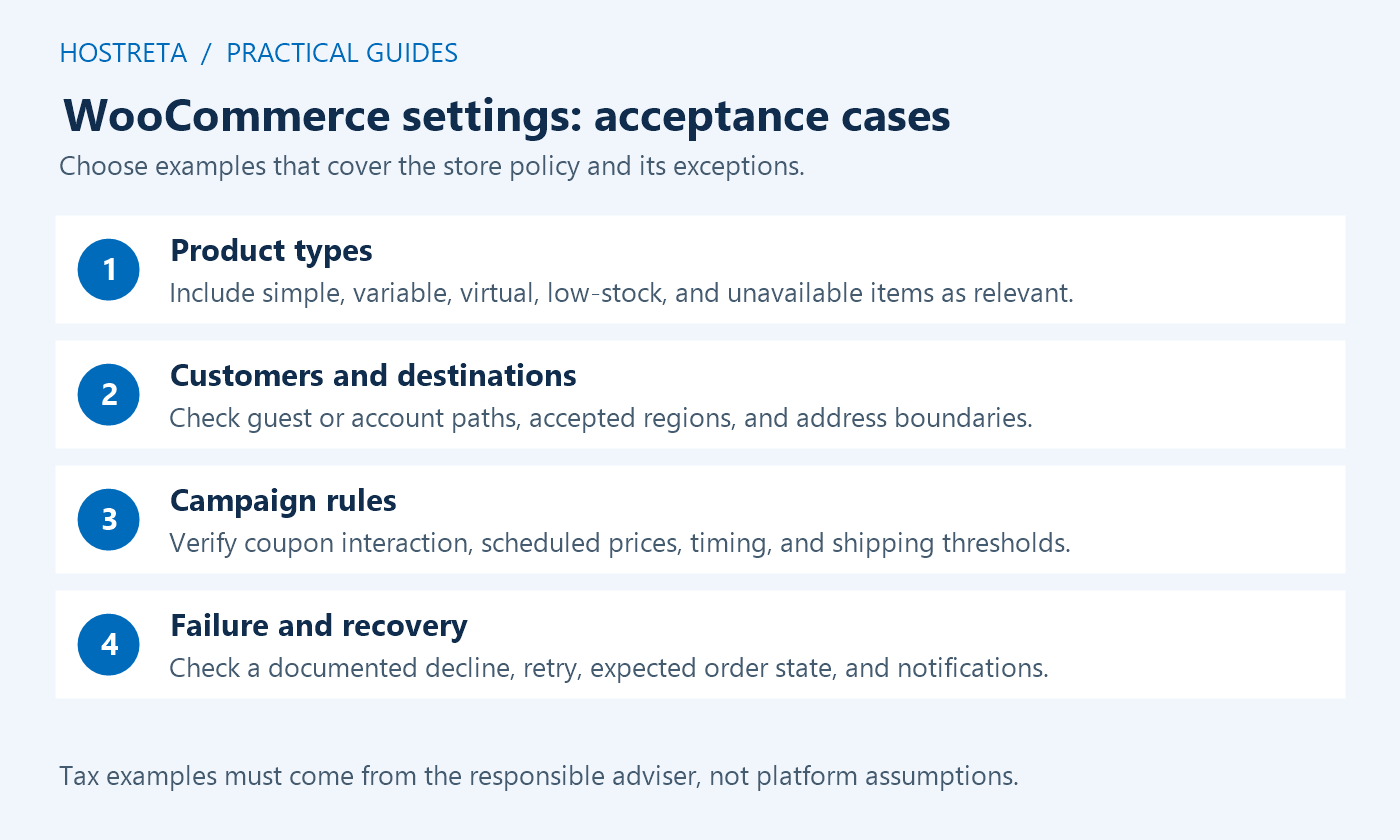
Prepare expected examples for product prices, discounts, shipping, and the tax treatment supplied by the responsible accountant or adviser. WooCommerce settings can implement rules, but the platform does not determine which legal obligations apply to the business.
Compare displayed totals on the product page, cart, checkout, order record, and relevant messages. Include sale items and a representative coupon. If a value differs, identify whether the cause is configuration, a product override, an integration, rounding, or an incorrect expectation before changing unrelated rates.
Use the gateway’s supported test workflow and confirm its environment. WooCommerce settings should not send a staging test to a live payment account unintentionally. Verify successful, rejected, and interrupted cases with synthetic data, including the final order status and customer message.
The test-order guide describes safe testing expectations. A successful checkout screen alone is not enough: inspect the intended gateway result, order record, stock effect, and notifications. Do not repeatedly retry a live transaction while diagnosing an uncertain result.
Review enabled emails, recipients, sender identity, templates, and the event that triggers each message. WooCommerce settings should match the actual fulfillment workflow. Not every product type or order state produces the same sequence, so define expected messages for representative scenarios.
Check both application generation and delivery evidence. A log that says sent may only establish that the application handed a message to a transport. Confirm the synthetic recipient receives the expected content, and keep customer details out of public logs or screenshots.
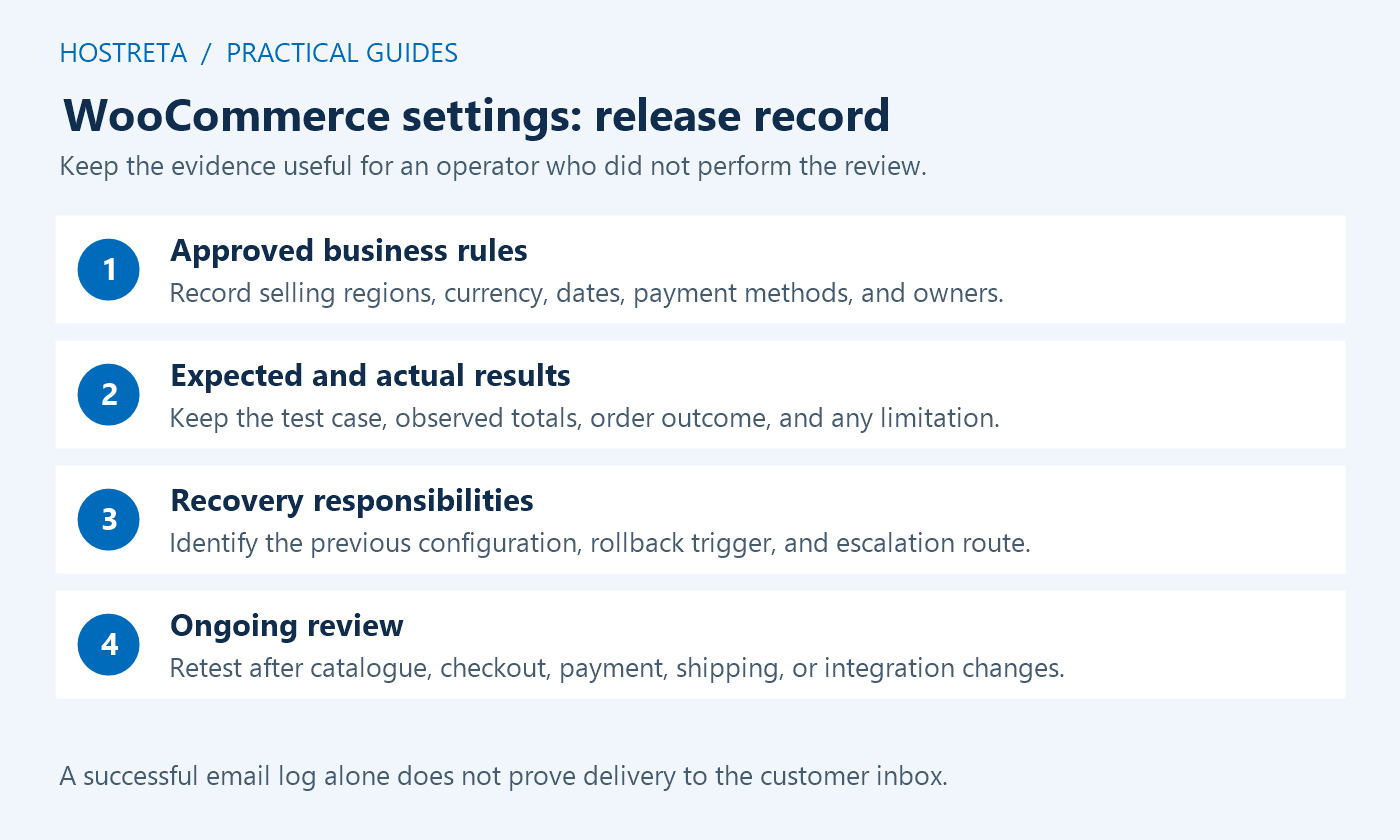
Record the accepted configuration, test cases, change window, and responsible operator. WooCommerce settings can affect live orders immediately. Promote only the intended changes and preserve current customer activity instead of replacing the live database with an older staging copy.
After release, verify a suitable non-destructive public journey and monitor relevant failures. Keep a data-aware recovery plan and a clear escalation route. A campaign is easier to operate when staff know who handles shipping exceptions, payment issues, inventory discrepancies, and missing messages.
| Scenario | Evidence to check |
|---|---|
| Ordinary physical product | Correct availability, destination methods, totals, and order state |
| Product variation | Correct SKU, price, stock, and shipping attributes |
| Virtual or downloadable item | Appropriate delivery requirements and access behavior |
| Coupon or scheduled sale | Eligibility, time boundaries, totals, and exclusions |
| Unsupported destination | Clear expected availability or delivery message |
| Payment failure | Useful customer feedback, safe retry behavior, and correct record |
| Completed test workflow | Expected stock, fulfillment information, and messages |
Adapt the matrix to the store rather than testing every theoretical feature. WooCommerce settings are accepted when the actual requirements work, not when every administration tab has been opened. Keep the expected result beside the observed result and resolve meaningful differences.
Review bestsellers and campaign products first, including variations and bundles where relevant. Check names, identifiers, prices, images already approved for the product, stock, and required delivery data. A correct global setting cannot repair a product with missing or incorrect source values.
Confirm the site time zone and scheduled sale boundaries. WooCommerce settings and product schedules should reflect the campaign’s intended local timing. Verify the saved dates and a controlled boundary case on staging instead of changing the live store clock to simulate the event.
Keep the campaign’s advertised promise consistent with actual eligibility. If only selected products qualify, make that clear on the landing page and in the coupon behavior. Record any exclusions and test a nonqualifying product as well as a qualifying one.
Trace the order statuses used by each payment method and the relevant stock transitions. A pending payment, an on-hold order, a cancelled order, and a paid order may follow different rules. Do not treat the hold-stock field as a universal expiry timer for all incomplete purchases.
If another system owns inventory, coordinate the integration and timing. WooCommerce settings can conflict with an external feed if both sides assume they are the source of truth. Test a controlled change and confirm how quantities and availability reconcile.
Use synthetic records and record expected deductions or restoration. Do not perform destructive stock experiments on live popular products during a campaign. Keep a targeted correction process for discrepancies instead of restoring an old database over new orders.
Test values just below, at, and above the intended threshold, with the applicable discount and tax expectations. A free-shipping rule can interact with coupon eligibility or the basis used for the comparison. Read the supported method’s documentation and verify the exact business rule.
Include representative postcodes, neighboring zones, and the fallback destination. WooCommerce settings should not unexpectedly offer a cheap method to an excluded area or omit a supported method from a valid address. Check the customer-facing label as well as the numeric cost.
For live carrier rates, distinguish a local configuration test from the carrier’s external service. Follow its supported test method and limits. Keep a plan for unavailable quotes and clarify delivery estimates rather than promising a holiday arrival that the carrier has not committed to.
Remove fields only when they are not required by the product, payment, fulfillment, or approved business process. A shorter form is not useful if it prevents a shipment or causes gateway validation failures. Test mobile entry, error messages, and return paths.
Choose account creation and guest checkout deliberately. Some products or memberships require accounts, while an ordinary store may support guests. WooCommerce settings should match that requirement and clearly explain the expected path rather than forcing a universal recommendation.
Check the active checkout implementation and extensions. Block-based checkout and classic checkout can have different integration requirements. Verify supported customization rather than assuming a field-editing technique from one path works unchanged in the other.
Use the email settings documentation to identify available messages and their triggers. Review recipients, sender identity, required content, and privacy. A refund notification and a completed-order message serve different purposes and may not occur in every scenario.
Check the mail provider’s supported authentication and domain configuration. SMTP or an API can provide a transport, but delivery and inbox placement also depend on provider behavior, recipient systems, content, and reputation. Do not promise that changing one sender field guarantees arrival.
Inspect synthetic messages on mobile and verify links, amounts, and product information. Keep any logging limited and protected because order messages can contain personal data. Assign someone to monitor delivery failures during the promotion.
Have the responsible business owner approve return, refund, shipping, support, and delivery-cutoff information. WooCommerce settings can link to those pages or display notices, but their wording and legal suitability require the appropriate business and professional review.
Test that the links reach the intended current pages and remain usable on checkout and mobile. A checkbox label should describe the action clearly, and customer-facing promises should match the operational process. Avoid hidden contradictory rules across product pages, policies, and emails.
Assign an owner and an expiry or review date to temporary notices. A holiday banner left visible after the campaign can confuse customers just as an absent warning can. Verify how the notice is scheduled or removed through the supported implementation.
Check eligible public caching and the exclusions required for personalized pages. WooCommerce settings do not by themselves configure every host or edge cache. Verify cart, checkout, account, and relevant API behavior through the complete request path.
Use synthetic independent sessions to confirm one shopper does not receive another’s state. Check the effect of product and price updates on cached public output. A fast stale price or private account response is a correctness failure rather than a performance success.
For capacity, use an authorized controlled rehearsal with representative scenarios and external-service isolation. Do not treat a single fast homepage view as evidence that checkout handles the expected promotion workload.
Keep the approved business rules, changed fields, product sample, addresses, expected totals, payment test results, messages, and unresolved issues in a concise record. WooCommerce settings are easier to maintain when the next operator can understand why a value was chosen.
Review after material plugin, theme, gateway, shipping, or inventory changes. Keep a known working configuration and a plan that preserves recent transactions. A settings export can help documentation, but it is not automatically a complete store recovery package.
If you need technical implementation support, KAWEDMA offers website development and hosting services. Provide representative workflows, approved rules, external integrations, and acceptance checks, then request a staging demonstration and a documented handover.
Use the provider’s supported staging and test workflow for routine validation. Do not initiate live charges merely because a generic checklist recommends it. Any separately authorized live verification needs a clear purpose and the responsible operator’s process.
Review global and product or variation-level behavior, plus external integrations. Test representative orders and their state transitions. A single global checkbox does not establish that every SKU has correct quantities and policies.
No. It may show application generation or transport handoff. Verify the relevant provider evidence and synthetic recipient result. Keep delivery monitoring separate from the WooCommerce email template configuration.
The approved WooCommerce settings produce correct representative orders, preserve privacy and data, match customer promises, and have recorded acceptance and recovery ownership. Resolve or explicitly assign remaining issues before the campaign begins.
Keep the final review date and configuration owner with the campaign notes. If a gateway, carrier, product feed, or checkout extension changes afterward, repeat the affected acceptance cases before assuming the earlier result still applies. A maintained record helps the team distinguish an approved setting from an accidental later change.
We may earn a commission on purchases made through these links, at no extra cost to you.
Don’t miss the chance to participate in the biggest giveaway of this year.