HowTo

How to Set Up WooCommerce Coupons for a Holiday Sale
A good coupon can lift average order value, reward subscribers, and give you a reason to email your list. A badly configured one can stack with sale prices, run forever, or get shared on deal sites and wipe out your margin. Setting up WooCommerce coupons properly takes about ten minutes per code, and those ten minutes protect your profit for the whole holiday season.
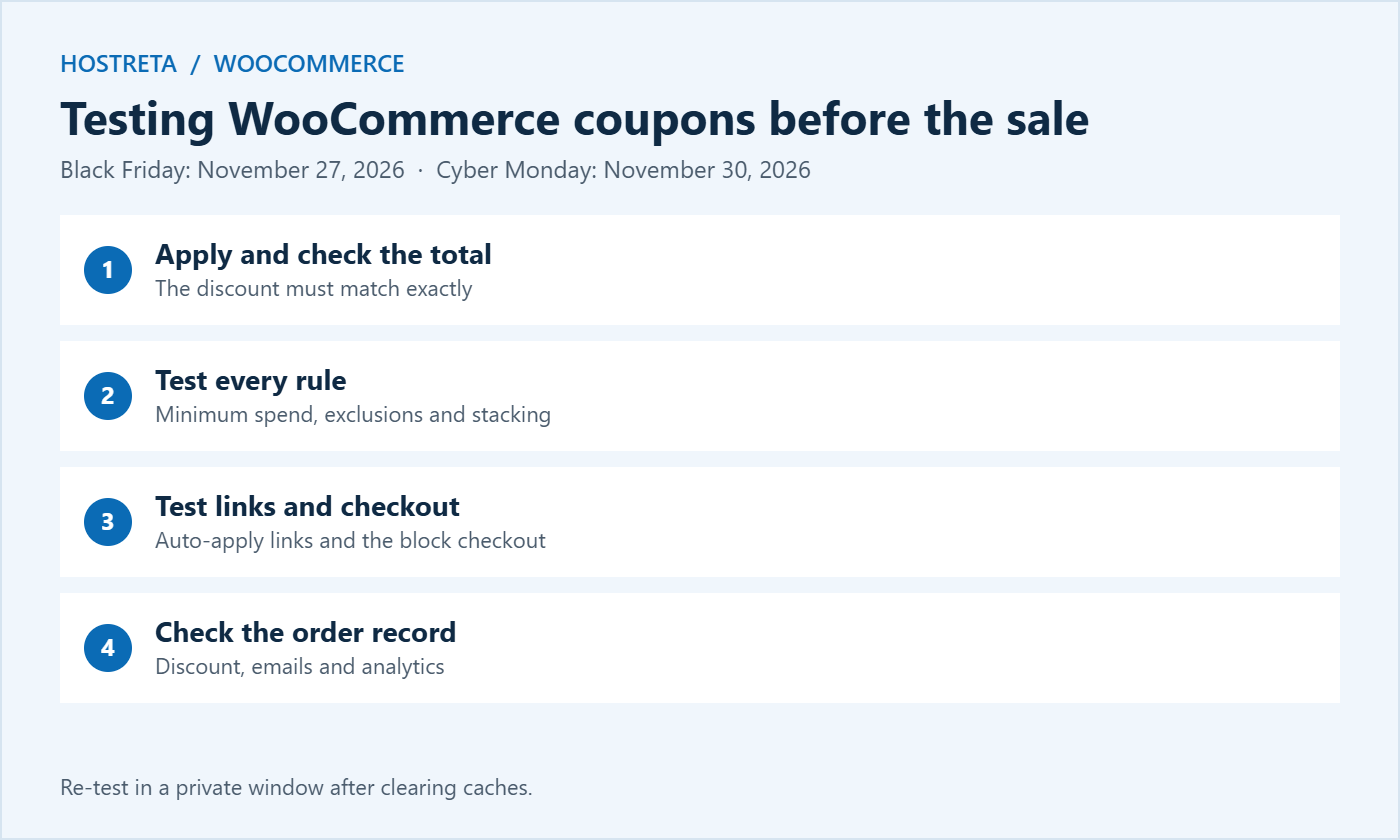
Black Friday 2026 falls on November 27 and Cyber Monday on November 30, with many stores running offers for the whole of late November. This guide covers the types of WooCommerce coupons available, creating your first sale coupon, usage restrictions, global coupon settings, auto-applied coupon links, coupon strategies that protect margin, fraud and abuse prevention, testing before launch, and measuring results afterwards.
Shoppers are more price-aware than ever, and many compare stores before buying. A clear coupon gives them a reason to choose you, and it lets you target offers precisely: new subscribers, returning customers, specific categories, or orders above a certain value. Unlike a site-wide sale price, WooCommerce coupons can be limited, tracked, and switched off instantly.
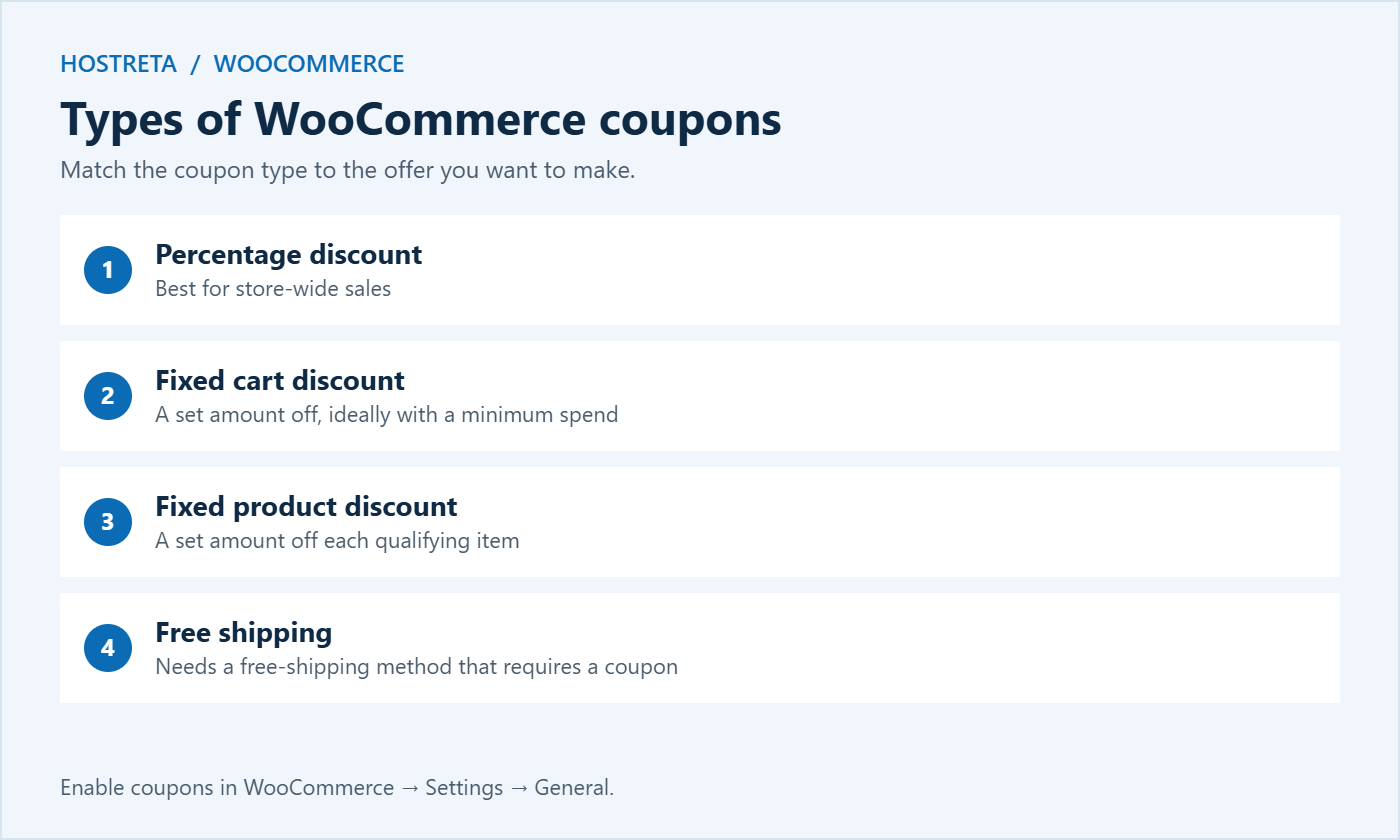
First, make sure coupons are enabled in WooCommerce → Settings → General, where you can also choose whether multiple WooCommerce coupons are calculated sequentially. WooCommerce describes every option in its coupon management documentation.
Percentage discounts feel generous on expensive items and are simple to communicate. Fixed cart discounts work well with a minimum spend — “$15 off orders over $100” — because they protect margin on small orders. Fixed product discounts suit offers on specific items, and free shipping is often the most attractive offer of all for low-priced products, where shipping makes up a large share of the total.
HOLIDAY20.Good codes are easy to remember, easy to type on a phone, and tell you where they came from. A simple pattern like BF26-EMAIL, BF26-INSTA, and BF26-VIP lets you compare channels in your reports. Avoid generic codes such as SALE or DISCOUNT, which shoppers guess and share.
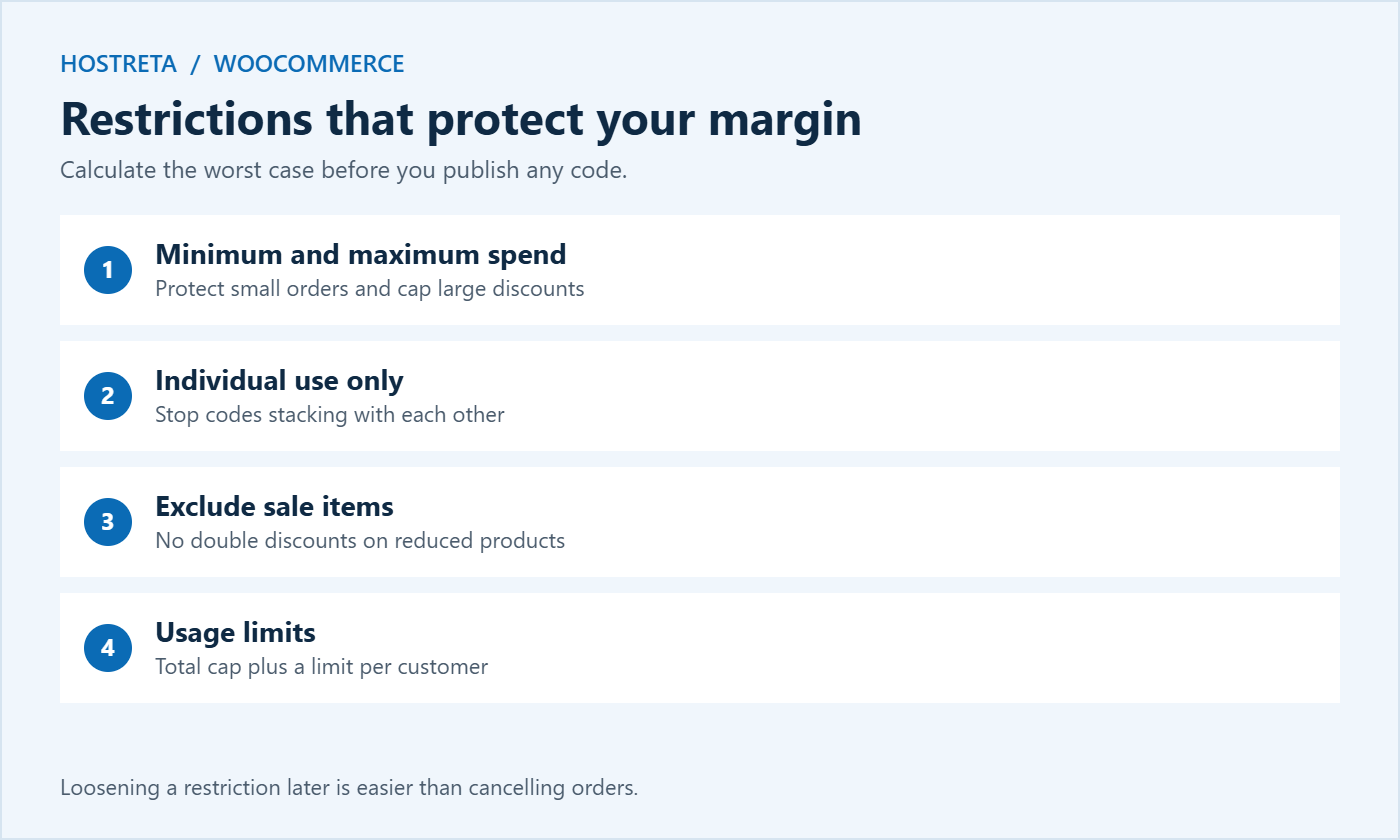
On the Usage restriction tab:
On the Usage limits tab, set a total usage limit and a limit per user. Together these prevent a code spreading on deal sites from becoming expensive.
Before publishing any of your WooCommerce coupons, calculate the worst case: what happens if the coupon is used on your lowest-margin product, combined with free shipping, by hundreds of people? If that scenario loses money, add restrictions — exclude low-margin categories, raise the minimum spend, or cap total uses. It’s far easier to loosen a restriction later than to explain why you cancelled orders.
Typing a code is friction, and a forgotten code is an abandoned cart. Two options:
Use these links in emails and ads, and still show the code on the page so shoppers know the discount applied. Pair them with UTM parameters to track campaigns — see UTM Parameters: Track Every Campaign Link. Plugins that add BOGO deals, store credit, and scheduled coupons are compared in WooCommerce Coupon Plugins: 7 Essential Checks for a Safe Promotion.
Plan every offer on a calendar so codes, emails, and banners line up — see Black Friday Marketing Calendar: A Countdown Plan for Small Stores.
Scheduled sale prices show reduced prices to everyone automatically; WooCommerce coupons apply only when entered or linked. Use sale prices for broad public offers and coupons for targeted, trackable offers. If you use both, decide in advance whether coupons can apply to sale items. Scheduling is covered in How to Schedule a WooCommerce Sale in Advance, and a countdown timer can add urgency — see How to Add a Countdown Timer in WordPress for Your Sale.
Include coupons in your full checkout test — see How to Test Your Checkout End to End Before Peak Season.
Go to Analytics → Coupons in WooCommerce to see how often each code was used and the total discount given. Compare that with orders and revenue in the same period. Useful questions:
Write down what worked so next year’s WooCommerce coupons start from real data.
A great coupon is wasted if the store slows down when shoppers arrive. Make sure your plan can handle the extra traffic — see WooCommerce Hosting Requirements. Kawedma WordPress hosting, managed WordPress hosting powered by Rocket.net, and a Kawedma VPS server give WooCommerce room to grow. Secure checkout with an SSL certificate, and promote your codes across social platforms with SocialBee.
A few store-wide settings change how every code behaves, so review them before you create holiday WooCommerce coupons:
Percentage WooCommerce coupons can produce totals with awkward cents, especially when tax is included in prices. Check a handful of real carts and make sure totals round sensibly. If you sell in several currencies, test codes in each currency, because fixed amounts may not convert the way you expect. Clear, predictable totals build trust at the most sensitive moment of the purchase.
A code nobody sees can’t drive sales. Make your offers visible at every stage:
Be specific about conditions. “20% off everything except sale items, orders over $50, until November 30” avoids disappointment and support emails. Honest, clear terms also keep your WooCommerce coupons on the right side of consumer protection rules in many countries, which require genuine discounts and clear terms.
On mobile, the coupon field is often hidden behind a small link. If you promote codes heavily, make sure shoppers can find where to enter them, or rely on auto-apply links so the discount appears without typing. A missing or hard-to-find field is one of the most common reasons WooCommerce coupons lead to abandoned carts instead of sales.
A tidy coupon list makes it much easier to plan next season and avoids old codes accidentally working months later. Before any bulk changes to products or prices, take a backup — see Store Backup and Rollback Plan for Peak Sales Days.
Yes, unless you tick “Individual use only.” Decide your stacking rules before the sale and test combinations carefully.
Tick “Exclude sale items” on the Usage restriction tab. Products with a sale price will then be ignored by that coupon.
Core WooCommerce coupons have an expiry date but no start date. Publish the coupon when the sale begins, or use a plugin that adds scheduled start dates.
Check the expiry date, minimum spend, product restrictions, usage limits, and whether the customer’s email matches any allowed list. Caching can also hide changes, so test in a private window.
Here is a simple set of WooCommerce coupons a small store could run across the season. Adjust amounts to your margins:
WELCOME10: 10% off a first order for new email subscribers, one use per customer, minimum spend $30.VIP-EARLY: 20% off for subscribers only, restricted to allowed emails or sent as unique codes, excluding sale items.BF26: tiered discounts through a plugin, or a single 15% code with a $60 minimum spend and a total usage cap.CYBER26: free shipping on all orders, valid for 24 hours.GIFT15: $15 off orders over $100 on gift categories, ending on your last delivery date before Christmas.THANKS10: a thank-you code included in holiday order emails to bring customers back.Spacing offers like this gives you a reason to contact customers several times without discounting every order. It also gives you clean data on which type of WooCommerce coupons your audience responds to best.
Give each partner a unique code so you can track sales and pay commissions accurately. Set an expiry date, a usage cap, and exclusions that match your agreement. If you run an affiliate programme, link codes to affiliate accounts so both tracking methods agree — see How to Track Affiliate Links and Clicks.
With WooCommerce Subscriptions, you get extra coupon types such as recurring discounts and sign-up fee discounts. Decide whether a holiday discount should apply only to the first payment or to every renewal, and test both cases.
Core WooCommerce creates one code at a time. Plugins can generate hundreds of unique single-use WooCommerce coupons for email campaigns, printed inserts, or partners, which makes leaks much less damaging.
If you rarely run coupon promotions, a visible empty coupon field can send shoppers away to search for codes. Some stores hide it behind a small link and rely on auto-apply links instead.
Coupons themselves don’t affect rankings, but a clear offers page that lists current promotions can attract searches for your brand plus “discount code” and keep shoppers on your site instead of third-party coupon sites.
Set up your holiday WooCommerce coupons this week, test each one carefully, and you will go into the busiest weekend of the year with offers that sell without hurting your margin.
We may earn a commission on purchases made through these links, at no extra cost to you.
Don’t miss the chance to participate in the biggest giveaway of this year.