Marketing

Black Friday Marketing Calendar: A Countdown Plan for Small Stores
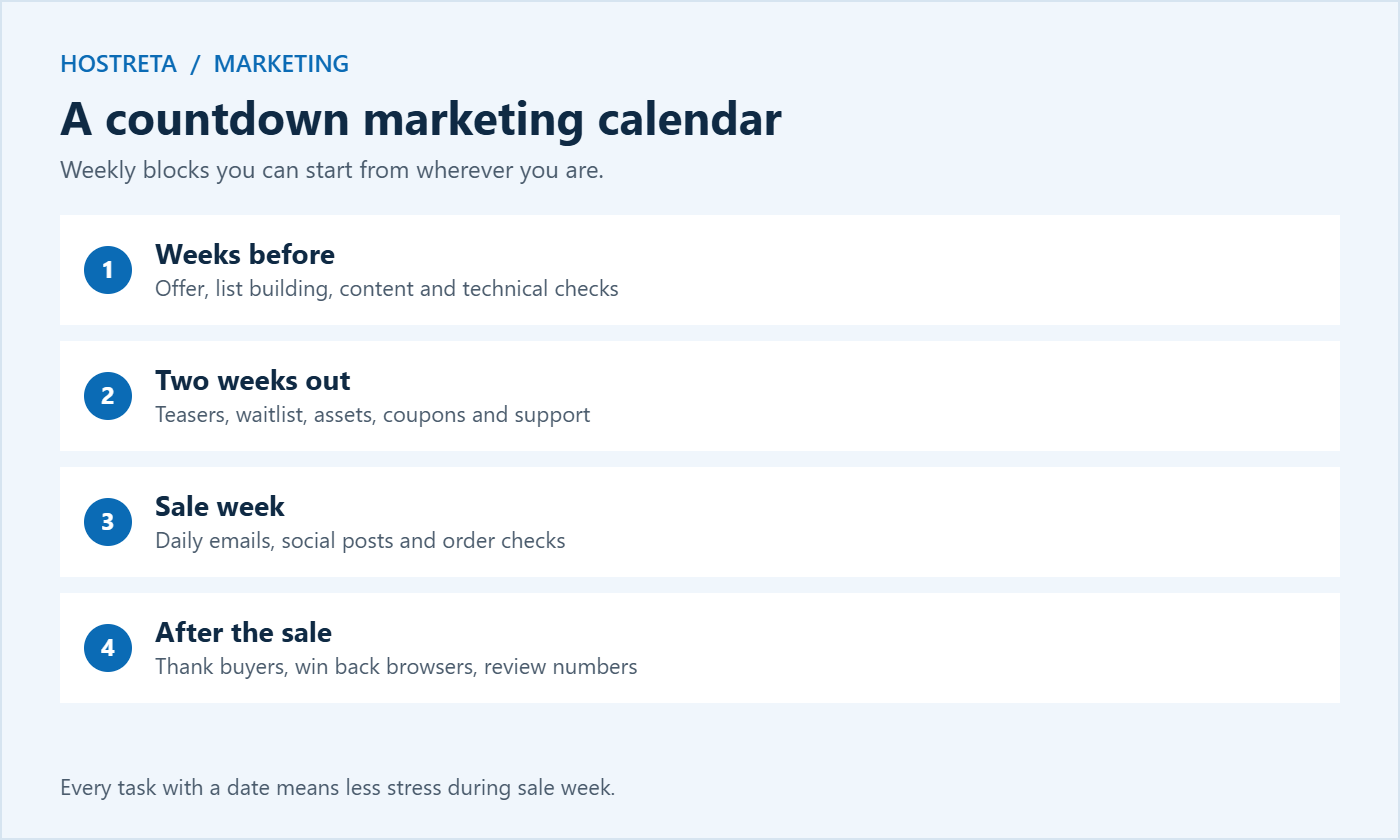
The stores that do well on Black Friday aren’t the ones that post an offer on the day. They’re the ones that spent the previous weeks building an audience, warming up their list, and preparing every asset in advance. A Black Friday marketing calendar turns that into a simple countdown you can follow, even as a one-person business.
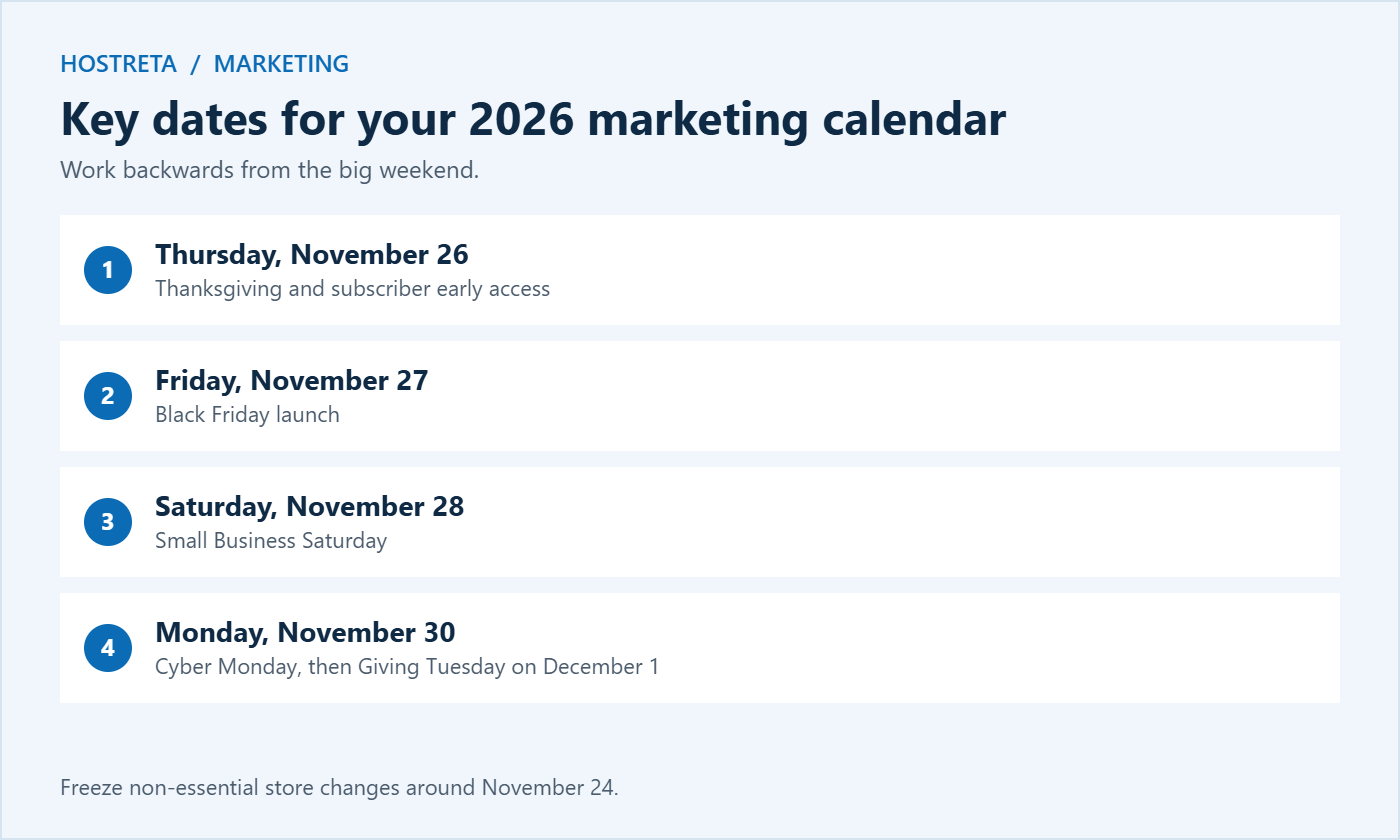
This marketing calendar is built around the real 2026 dates: Thanksgiving on Thursday, November 26, Black Friday on Friday, November 27, Small Business Saturday on November 28, Cyber Monday on November 30, and Giving Tuesday on December 1. It works backwards from sale day in weekly blocks, so you can start wherever you are and still catch up.
A written marketing calendar also reduces stress. When every email, post, and task has a date, you spend sale week executing rather than inventing.
Your offer is the heart of the marketing calendar. Common options include a store-wide percentage discount, tiered discounts that reward bigger carts, free shipping, gift with purchase, and bundles. Pick one main offer and keep it simple enough to explain in a single sentence. Calculate the worst-case margin before you commit, and decide whether the offer applies to items already on sale. Coupon setup is covered in How to Set Up WooCommerce Coupons for a Holiday Sale, and bundles in How to Set Up Product Bundles in WooCommerce.
Most small stores can send one email a day during sale week without hurting engagement, as long as each message has a clear purpose: teaser, early access, launch, bestsellers, last chance. Segment where possible, so people who already bought get a thank-you instead of more offers — see Email Segmentation for Small Businesses Made Simple. Make sure your domain is authenticated so emails reach the inbox — see Email Deliverability: SPF, DKIM and DMARC. A branded business email or Google Workspace account helps too.
Plan two or three posts a day across your main platforms during sale week, plus stories and short videos. Batch-create graphics in advance and schedule them with a tool such as SocialBee, so you can spend the day answering comments instead of designing. Ideas for faster content are in How to Use AI for Social Media Content Creation and Social Media Content Calendar: Plan a Month in 1 Hour.
A perfect marketing calendar fails if the store slows down when shoppers arrive. Check your plan’s limits well before sale week — see Should You Upgrade Your Hosting Plan Before Black Friday? and WooCommerce Hosting Requirements. If you need more capacity, Kawedma WordPress hosting, managed WordPress hosting powered by Rocket.net, a Kawedma VPS server, or a managed VPS give your store room to grow. Add 360 Monitoring so you hear about problems before customers do.
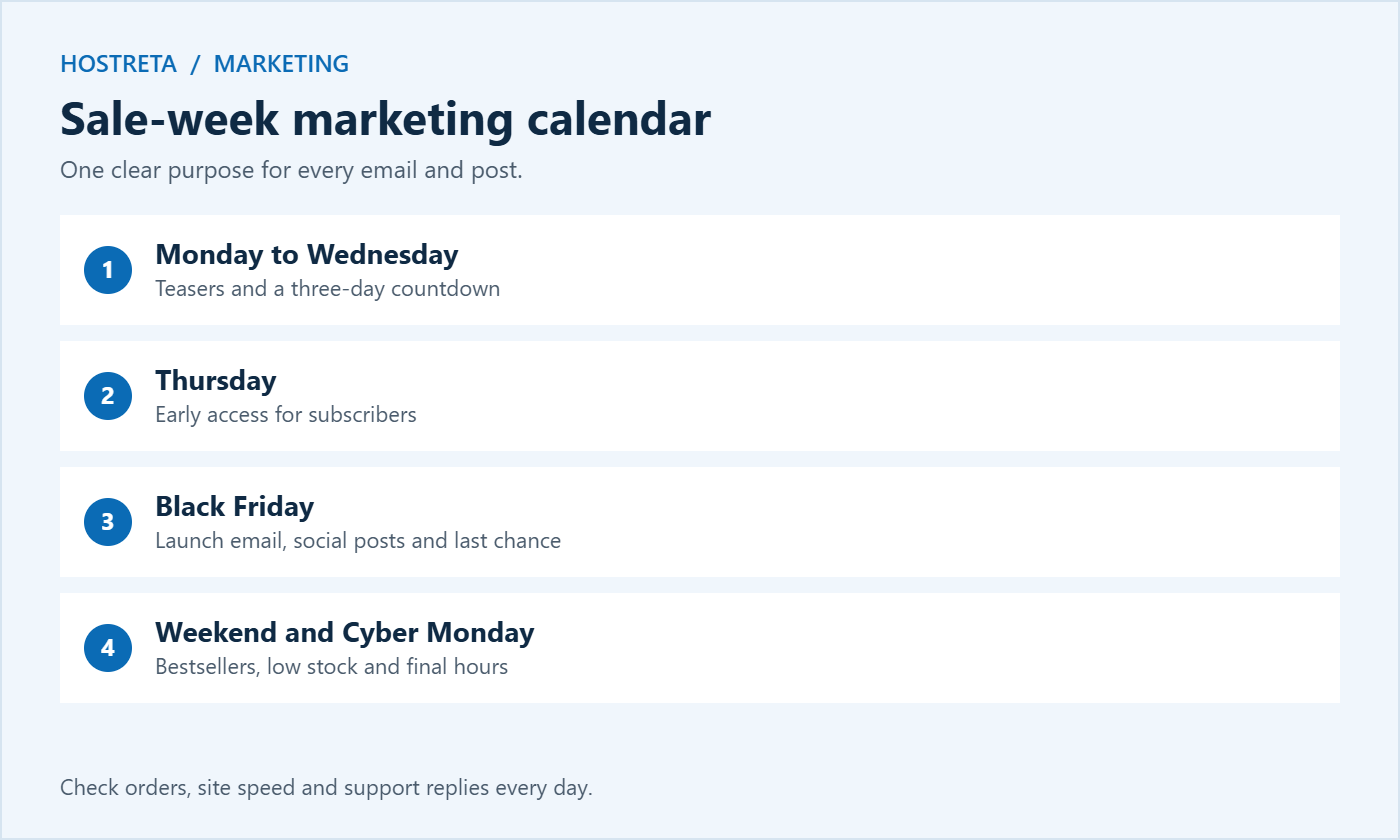
You don’t need special software. A spreadsheet, a shared document, or a project board works fine. Follow these steps to turn the plan above into your own marketing calendar:
Project tools can make this easier if you work with a team — see Best Project Management Tools for Web Teams. The important thing is that everything lives in one place.
For every email or post, note the date and time, the channel, the audience or segment, the main message, the offer or call to action, the link with UTM tags, and the asset needed. This level of detail sounds like extra work, but it saves hours during sale week and makes the review afterwards far easier, because you can compare results against exactly what you sent.
Running out of ideas is one of the most common reasons a marketing calendar falls apart halfway through November. Use these prompts to fill the gaps:
Repurpose each piece across channels: a gift guide can become an email, five social posts, a short video, and a Pinterest pin — see How to Repurpose One Blog Post Into 10 Pieces of Content. Good copy matters at every stage, so revisit How to Write Product Descriptions That Sell before you write sale emails.
If you run paid ads, plan the budget week by week rather than spending everything on Black Friday itself. A typical small-store approach:
Set daily caps, check results each morning, and pause anything that clearly isn’t working. A marketing calendar keeps spending tied to a plan instead of reacting to panic.
A store selling physical gifts needs shipping deadlines at the centre of its marketing calendar, with a push for faster delivery options in December. Digital product sellers can keep promoting until Christmas Eve, because downloads arrive instantly — see WooCommerce vs Easy Digital Downloads. Service businesses may prefer gift vouchers and January booking offers. B2B sellers often see quieter Black Friday traffic but stronger end-of-year budget spending in December. Adjust the plan to how your customers actually buy.
Black Friday isn’t the end of the season. Extend your marketing calendar through December to capture gift buyers who shop later:
Keep the same habits as in November: one clear purpose for every email, scheduled social posts, and daily checks on orders and site performance.
Before the sale starts, decide which numbers will tell you whether the marketing calendar worked. Useful measures include total revenue compared with last year, conversion rate, average order value, new email subscribers, revenue per email sent, return on ad spend, and the number of new versus returning customers. Record a baseline from a normal week in October so you can see the real lift.
After the season, compare each planned activity with its results. Which emails earned the most? Which social posts drove clicks? Which offer produced the best margin? These answers become the starting point for next year’s marketing calendar, which will be faster to build and more effective.
Write one page covering what you planned, what you actually did, the results, and three things to change next year. Store it with your marketing calendar so you can find it next October.
Ideally six to eight weeks before the sale, in late September or early October. If you’re starting later, focus on email, a simple offer, and technical checks first.
Many stores open early access for subscribers on Thanksgiving or earlier. It rewards loyal customers and spreads traffic, which is easier on your hosting.
Black Friday through Cyber Monday is the classic window. Longer sales can work, but a clear end date creates urgency.
Use the sale-week section of this marketing calendar, keep the offer simple, and focus on your existing customers and email list.
No. One shared marketing calendar with a column for each channel works best, because you can see how email, social media, ads, and site changes line up on the same day.
Schedule everything for sale week at least a few days in advance, then check each post the evening before it goes out. Leave room for a few live, unplanned posts that respond to what customers are saying.
Update the product page immediately, remove it from scheduled posts and emails, and swap in a similar item. Keep a short list of backup products in your marketing calendar so you can react quickly.
Yes. Batch tasks into a few focused sessions, schedule as much as possible, and keep the offer simple. A small, well-executed plan beats an ambitious one you can’t finish.
The best time to start your marketing calendar is today. Open a spreadsheet, add the key dates for 2026, and fill in the first week of tasks. Once the structure is in place, each remaining step becomes a simple item to tick off, and you can walk into Black Friday prepared instead of rushed. Your customers will notice the difference in clearer offers, smoother checkout, and faster replies, and you will finish the season with data you can use to plan an even better year ahead.
Small stores that plan early consistently outperform those that improvise, and a clear marketing calendar is the simplest way to plan early.
We may earn a commission on purchases made through these links, at no extra cost to you.
Don’t miss the chance to participate in the biggest giveaway of this year.