Reviews

Business Email: Proton vs Zoho in 7 Essential, Safe Checks
Proton Mail vs Zoho Mail is a comparison of different workflows and security models. If you want professional email on your own domain but don’t want Google or Microsoft, two names come up again and again: Proton Mail and Zoho Mail. Both support custom domains and both are popular with small businesses — but they’re built around very different priorities.
This comparison of Proton Mail vs Zoho Mail covers privacy, security, features, setup, and which type of business each one suits best.
Proton Mail is built by a Swiss company around end-to-end encryption. Messages between Proton users are encrypted automatically, and you can send password-protected emails to people on other providers. Proton describes encrypted storage and a privacy-focused design, but ordinary external email is not automatically end-to-end encrypted in every situation. Consider metadata, recipient behaviour and account recovery as well.
Zoho Mail encrypts data in transit and at rest and has a clear no-ads policy for its business plans. It offers S/MIME on eligible plans and administrative controls, but it isn’t end-to-end encrypted by default the way Proton is.
Both support two-factor authentication — turn it on immediately. If you need an authenticator app, see Two-Factor Authentication Apps Compared.
Proton
Zoho
If you’re also considering the big two, read Google Workspace vs Microsoft 365 for Small Business.
Setup is similar on both services:
Both dashboards walk you through each DNS record and show when it’s verified. If you’re unsure about record types, see DNS Record Types Explained: A, AAAA, CNAME, MX and TXT.
Pricing and plan limits change, so check current pricing and test each service with a trial before moving your whole team. For more options, see Best Email Hosting Providers for Small Businesses.
A fast, well-supported host makes every WordPress task smoother. Kawedma WordPress hosting and managed WordPress hosting powered by Rocket.net include staging sites for safe testing, while shared hosting from Hosting.com or Kawedma shared hosting suit smaller sites. Protect the site with an SSL certificate and automatic backups from CodeGuard.
Begin with the business email tasks that happen every week. A solo consultant may need a reliable inbox, a calendar and a few aliases. A support team may need several people handling the same address with clear ownership. A business using a CRM may depend on message synchronisation and contact history. These are different requirements even when the advertised mailbox capacity is similar.
Write down which tasks are essential and which are optional. Include devices, operating systems, external collaborators and any software that connects to mail. Test the actual combinations rather than assuming a familiar product name means the integration will work. A provider can be a good service while still being a poor fit for one important workflow.
Business email is also an operational dependency. Consider who will answer a setup question, restore access after a lost device and maintain domain records. A service your team can administer confidently may be more useful than a longer feature list nobody understands. Give these responsibilities a named owner before you choose a plan.
Encryption in transit protects a connection between systems. Encryption at rest concerns stored data. End-to-end encryption concerns who can decrypt the content in the intended communication path. These terms describe different protections. Do not treat them as interchangeable or assume that choosing one provider automatically makes every conversation end-to-end encrypted.
Proton documents encrypted communication between Proton users and additional options for external recipients. Its Bridge encryption guidance explains important differences between ordinary external messages and protected workflows. Test the method your clients will actually use, including how they open a protected message and how you communicate any password through a separate appropriate channel.
Zoho documents encryption in transit and at rest, with S/MIME available on eligible plans. Confirm certificate requirements and the recipient experience before treating it as a solution for every conversation. An encryption feature that a client cannot use reliably may require a different agreed process for exchanging sensitive documents.
Neither service removes the need to protect devices, recognise phishing and manage access. A person can copy a message after opening it, and a compromised endpoint changes the threat picture. For regulated or contractually restricted work, evaluate the exact service terms, processing arrangements and required controls with the responsible specialist. This comparison is not a compliance certification.
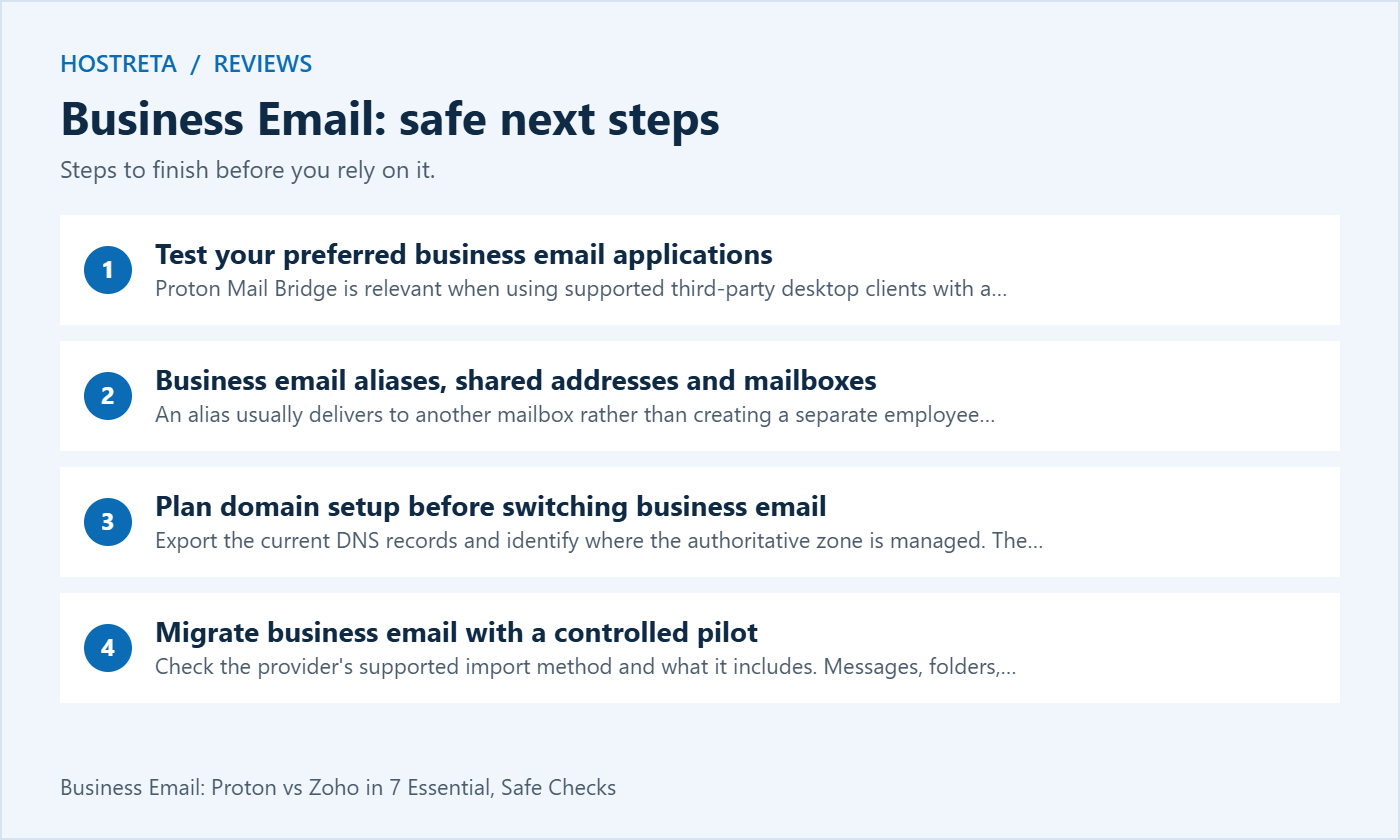
Proton Mail Bridge is relevant when using supported third-party desktop clients with a paid Proton Mail subscription. The Bridge runs locally and changes the setup compared with entering a conventional remote IMAP server directly. Check the official Bridge explanation and test the devices your team will keep using.
Zoho provides IMAP configuration guidance for supported access. Verify subscription eligibility, account settings and authentication requirements. Do not assume every free, regional or legacy plan includes identical features. A successful webmail login does not prove a desktop mail client or third-party integration is configured correctly.
During a pilot, test sending, receiving, searching, attachments, calendar invitations and replies from aliases. Include a mobile device and a desktop where those are part of normal work. Notice whether a message sent on one device appears as expected on the others. Small synchronisation problems become frustrating when multiplied across a whole team.
An alias usually delivers to another mailbox rather than creating a separate employee account. A group may distribute mail to several people. A shared inbox may add assignment and collaboration features. Product terminology differs, so ask what the selected business email plan actually provides. Several addresses in an advertisement do not necessarily mean several independent mailboxes.
| Need | Question to ask | Pilot test |
|---|---|---|
| Individual staff mail | Does each person need a paid account? | Separate sign-ins and recovery |
| Role address such as support | Alias, group or shared inbox? | Who receives and answers? |
| Reply from an alias | Is sending as that address supported? | Check the recipient’s From field |
| Former employee address | What happens after account removal? | Document retention and reassignment |
| External application | Which connection method is supported? | Send a controlled notification |
Do not solve a shared-address need by sharing one person’s password with the team. Prefer supported delegation or collaboration features and individual access where available. This makes offboarding and accountability easier. Record who owns each role address and what happens when the person responsible is away.
Export the current DNS records and identify where the authoritative zone is managed. The registrar and DNS provider may be different companies. Domain verification normally precedes mail routing changes, so complete the provider’s verification steps before sending production mail to new mailboxes. Use the exact values supplied by the selected account.
Create the required users and aliases before changing MX records. Keep the previous service available during the transition so the team can check for messages arriving through cached routes. Choose a clear cutover owner and avoid simultaneous unrelated changes to nameservers, website hosting and email whenever those can be separated.
Review SPF, DKIM and DMARC for the complete sending setup, including website notifications and any authorised marketing platform. Do not copy another domain’s records. A move between business email providers can leave obsolete authorisations behind or omit a service still in use. Record what each entry is for before editing it.
Check the provider’s supported import method and what it includes. Messages, folders, labels, calendars and contacts may not all move through the same process. Test one suitable account first and compare the result with the original. Count important folders and inspect representative older messages and attachments rather than checking only the newest inbox items.
Before migration, decide whether to clean up obsolete accounts and large archives. Do not delete business records simply to make a transfer faster. Retention obligations and company policy should guide that decision. Keep a recoverable copy or access to the source where appropriate until the migration has passed its acceptance checks.
Schedule training and support time alongside the technical transfer. Tell users which application to open, when to change their settings and how to report a missing message. A clear transition note prevents people from continuing to send from the old system after everyone else has moved. Test external replies after the cutover.
Use a worksheet with the number of paid users, billing term, storage requirements and required features. Add migration assistance, optional security or archival features and any overlapping subscriptions during the move. A low advertised monthly amount may assume annual billing or exclude a feature your team considers essential.
Compare the renewal or ongoing cost as well as an introductory offer. Check currency, taxes and cancellation terms in the provider’s current checkout for your region. This article intentionally avoids quoting a price that could change before you buy. Save a dated copy of the selected plan details when making the decision.
A bundle can be good value when you will use its applications. It can also duplicate tools you already pay for. List which subscriptions the new business email package actually replaces. Do not count an included feature as a saving if nobody needs it or if another required integration still forces you to keep the old service.
Enable appropriate multi-factor authentication and protect the administrator account. Establish how recovery works before the first lost phone or departing employee creates an emergency. Understand which recovery methods restore access and what limitations apply to encrypted data. A recovery process should be tested and documented without exposing secrets in shared notes.
For a team, review permissions and employee offboarding. Decide who can add users, change domain settings and manage role addresses. Confirm how records are retained or transferred when a person leaves. The right business email system needs to support the organisation’s responsibilities as well as the user’s preferred inbox interface.
Keep domain registration and DNS access under business control. Losing the domain can interrupt either provider. Maintain renewal reminders and recovery information independently of a single employee mailbox. The mail service is one part of the communication system; domain ownership and device management remain your responsibility.
If you are also considering a provider for domain registration, hosting and business email, KAWEDMA offers relevant services to review. Ask which mail platform is included, what assistance is available and which limits apply to the chosen plan. Treat it as another option to assess against the same requirements.
Do not assume KAWEDMA resells Proton or Zoho, or that every hosting package includes the same email features. Confirm the actual product before ordering. Keeping several services with one supplier can simplify administration, while using separate providers can fit other needs. Compare support, ownership, export options and ongoing costs in either case.
Choose Proton when the tested privacy and encrypted-message workflow fits your team’s priorities. Choose Zoho when the tested administration and application workflow fits better. These are evaluation directions rather than universal verdicts. A pilot result is more useful than assuming that one brand is always safer or cheaper for every business.
Before committing, confirm that essential messages arrive, replies use the correct identity, mobile and desktop access work, aliases behave correctly and an administrator can manage recovery. Record the chosen plan and the reasons for the choice. Revisit the decision when team size, storage or integration requirements change.
Usually the domain can stay the same while the mail provider changes, provided you control its DNS and the new service supports the domain. The migration still needs correct mailboxes, routing and authentication. Test both sending and receiving rather than treating a successful domain verification as a completed move.
No. Encryption protects particular parts of a communication path; it does not make every sender or request trustworthy. Train users to verify unusual requests and keep devices and accounts protected. A valid encrypted message can still contain a misleading instruction or originate from a compromised account.
A small pilot usually reveals compatibility and training issues before they affect everybody. Choose a representative user and normal workflows. Keep a rollback plan and access to the original service while verifying the transfer. Expand only after the required tasks have passed their checks.
Record the selected plan, test users, devices, message workflows and the result of each check. Note which business email features were confirmed and which questions still need a provider answer. Include a date, because a plan comparison can become outdated. Keep the record with your domain and mail administration notes so another team member can understand the decision.
Check the provider’s documented sending integration and acceptable-use policy for the particular plan. Business email for people and automated transactional sending are related needs, but they are not automatically the same product. Test a controlled WordPress notification and its reply path before relying on it for account recovery or orders. If another sending service is needed, include that cost and configuration in your business email comparison.
We may earn a commission on purchases made through these links, at no extra cost to you.
Don’t miss the chance to participate in the biggest giveaway of this year.



