Reviews

Best Abandoned Cart Plugins for WooCommerce Compared
Most people who add something to a cart never complete the purchase. Some were only browsing, but many were interrupted, distracted, or surprised by shipping costs. A well-timed reminder brings a share of them back — which is why abandoned cart recovery is among the highest-return tools a store can add, especially in the busy weeks around Black Friday on November 27, 2026.

This guide is updated for 2026. It explains how abandoned cart recovery works, why carts are abandoned, the features to compare, seven popular plugins and platforms, email versus SMS, writing reminders that convert, the latest sender and privacy rules, and how to measure results.

Why shoppers abandon carts

  • Unexpected costs: shipping, taxes, or fees revealed late in checkout.
  • Forced account creation before paying.
  • A slow or confusing checkout, especially on mobile — see How to Improve WooCommerce Checkout Speed.
  • Payment problems or missing preferred payment methods.
  • Comparison shopping: checking prices elsewhere before deciding.
  • Distraction: a phone call, a meeting, or a crying child.

Fixing these causes reduces abandonment in the first place. Abandoned cart emails then recover a share of the shoppers who still leave.

How abandoned cart recovery works

  1. A shopper adds items and begins checkout.
  2. The plugin captures their email address as soon as it’s entered, before the order is placed.
  3. If no order arrives within a set time, the cart is marked abandoned.
  4. A sequence of reminder emails goes out, each with a link that restores the cart.
  5. Recovered orders are tracked so you can see the revenue.

Logged-in customers are easiest to recover, since their email is already known. Express checkout methods such as Apple Pay may not share an email until payment is complete, so recovery rates vary by checkout setup.
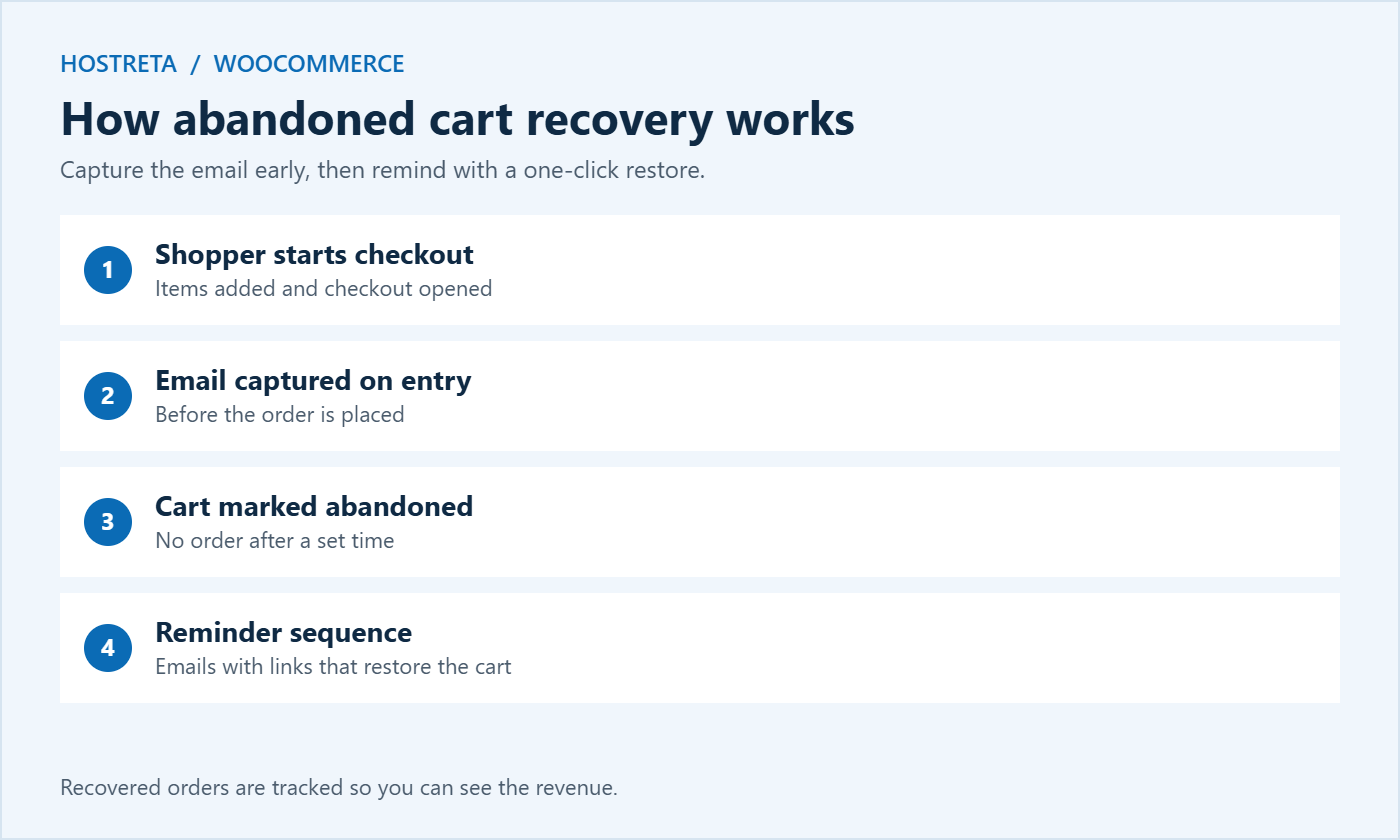
How abandoned cart recovery works in WooCommerce

Abandoned cart plugin features to compare

  • Email capture timing: capturing on field entry recovers far more carts than waiting for order creation.
  • Block checkout support: the Checkout block is the default for new WooCommerce stores, so capture must work there.
  • Sequence control: how many reminders and at what intervals.
  • Cart restore links that rebuild the exact cart in one click.
  • Templates you can edit without code.
  • Coupon support, ideally only in the later reminders, with unique single-use codes.
  • Reporting: carts abandoned, emails sent, orders recovered, and revenue.
  • Consent handling and easy opt-out.

7 abandoned cart plugins and platforms

  1. Cart Abandonment Recovery for WooCommerce (by CartFlows): free, simple, captures emails early, and reports recovered revenue. A strong starting point.
  2. Retainful: abandoned cart emails plus next-order coupons and referrals; free tier available.
  3. FunnelKit Automations: broader marketing automation including cart recovery, with visual workflows.
  4. MailPoet: an email plugin owned by Automattic with WooCommerce automations including abandoned cart emails, sending from within WordPress.
  5. Klaviyo: a powerful e-commerce email and SMS platform with detailed segmentation and flows.
  6. Omnisend: email and SMS automation built for online stores, with pre-built abandoned cart workflows.
  7. Mailchimp: a familiar email platform with WooCommerce integration and cart reminders on paid plans.

Check current features and pricing before choosing, and run only one recovery system so customers don’t get duplicate emails. Platforms are compared in Best Email Marketing Platforms for Small Businesses.
Email vs SMS abandoned cart reminders

  • Email: cheap, detailed, and expected. The default choice for nearly every store.
  • SMS: very high open rates, but costs per message, feels intrusive, and requires explicit consent in most places.
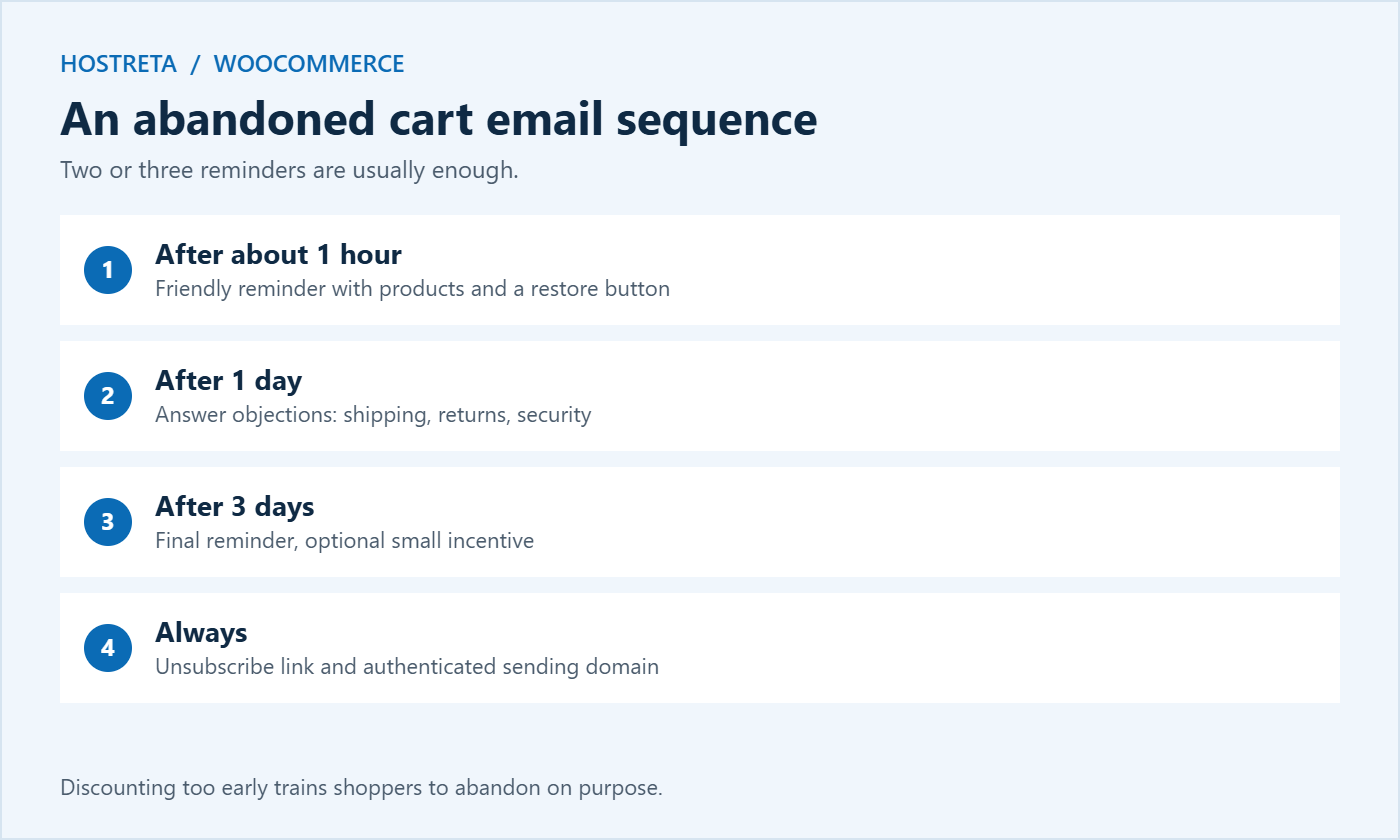
  • A sensible sequence: email after about an hour, a second after a day, and a final one after three days — adding a small incentive only at the end.
  • Don’t discount too early: you’ll train shoppers to abandon carts on purpose.
  • Make sure the emails actually arrive — see Emails Sent From WordPress: 7 Easy, Powerful Checks.

Abandoned cart email sequence timing

Writing abandoned cart emails that convert

  • Subject line: friendly and clear — “You left something in your cart.”
  • Show the products with images, names, and prices.
  • One big button that restores the cart.
  • Answer common objections: shipping costs, returns, delivery times, and secure payment.
  • Add social proof such as a short review.
  • Keep it short and mobile-friendly.
  • Offer help: a reply-to address or chat link for questions.

During the holidays, mention delivery cut-off dates and the end of your sale. Coupons are best kept to the final email — see How to Set Up WooCommerce Coupons for a Holiday Sale.

Sender rules, privacy, and consent

Since 2024, Gmail and Yahoo require bulk senders to authenticate their domain with SPF, DKIM, and DMARC, offer easy unsubscribes, and keep spam complaints low; Microsoft began enforcing similar rules for Outlook in 2025. Send abandoned cart emails from your own domain with proper authentication — see Email Deliverability: SPF, DKIM and DMARC. A business email plan from Kawedma or Google Workspace helps.

On privacy: you’re emailing people who entered their address during checkout, which is generally treated differently from marketing signups — but rules vary by country. Be transparent at the point of capture, include an unsubscribe link, honour opt-outs immediately, and mention the practice in your privacy policy — see Privacy Policy and Cookie Consent. If you’re unsure, take professional advice for your region.
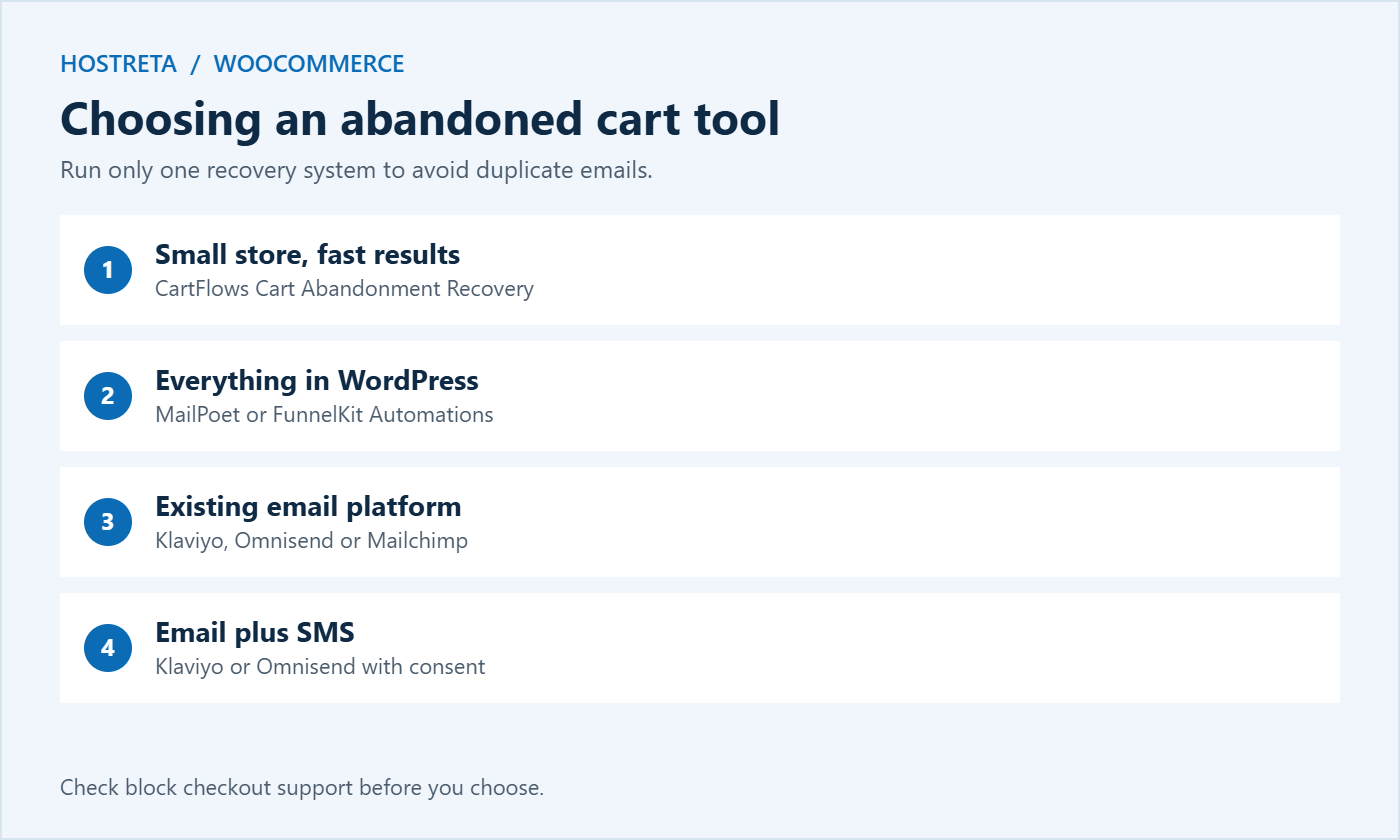
Picking the right abandoned cart tool

  • Small store, want results fast: the free CartFlows plugin.
  • Want everything inside WordPress: MailPoet or FunnelKit.
  • Already using an email platform: use its built-in automation, such as Klaviyo, Omnisend, or Mailchimp.
  • Want SMS as well: Klaviyo or Omnisend.

Choosing an abandoned cart plugin for WooCommerce

Reducing abandoned carts before they happen

Recovery emails are valuable, but the best abandoned cart strategy also reduces how many carts are left behind. A few checkout improvements make a noticeable difference:

  • Show shipping costs early, on product pages or in the cart, so there are no surprises at the final step.
  • Offer free shipping thresholds just above your average order value.
  • Allow guest checkout and make account creation optional.
  • Reduce form fields to the minimum needed to deliver the order.
  • Offer popular payment methods, including wallets like Apple Pay and Google Pay.
  • Display trust signals: secure payment badges, return policies, and contact details — see How to Build Trust Signals on Your Website.
  • Keep checkout fast on mobile, especially over slower connections.
  • Test checkout regularly for errors — see How to Test Your Checkout End to End.

Even small improvements here reduce abandonment for every visitor, not just those who receive reminder emails.

Setting up abandoned cart recovery step by step

  1. Choose one tool based on where your email marketing already lives.
  2. Install and connect it on staging first, then on the live store.
  3. Move the email field to the top of checkout so it’s captured early.
  4. Set the abandonment time, usually 15 to 60 minutes after the last activity.
  5. Create the email sequence with your brand colours, logo, and tone.
  6. Add a unique coupon only to the final email, with an expiry date and single use.
  7. Exclude customers who completed the order, so nobody receives reminders after buying.
  8. Send test emails to yourself and check the restore links on mobile.
  9. Monitor reports weekly and adjust timing and wording.

Segmenting abandoned cart emails

Not every abandoned cart deserves the same message. Consider different sequences for first-time visitors and returning customers, for high-value carts and small ones, and for carts containing specific categories. A returning VIP with a large cart might get a personal note and free shipping, while a first-time visitor with one low-priced item might get a simple reminder. Segmentation tips are in Email Segmentation for Small Businesses Made Simple.

Abandoned cart recovery during Black Friday 2026

Abandonment rises during big sales because shoppers compare offers and fill carts across several stores. Adjust your sequence for the season:

  • Shorten the timing: send the first reminder within 30 to 60 minutes, because deals end quickly.
  • Mention the deadline: “Our Black Friday prices end Monday at midnight.”
  • Avoid extra discounts on top of sale prices unless margins allow it.
  • Highlight low stock only when it’s genuinely low.
  • Include delivery cut-off dates in December reminders.
  • Check sending limits with your email provider, as volumes rise sharply during sale week.

Plan these changes alongside the rest of your campaign — see Black Friday Marketing Calendar.

Measuring abandoned cart performance

Track a few clear numbers every week:

  • Cart abandonment rate: the percentage of started checkouts that don’t become orders.
  • Capture rate: how many abandoned carts include an email address you can contact.
  • Email open and click rates: useful signals, though opens are less reliable since Apple Mail Privacy Protection.
  • Recovery rate: the share of contacted carts that turn into orders.
  • Recovered revenue: the total value of orders that came back.
  • Unsubscribe and complaint rates: warning signs that emails feel too pushy.

Small changes can move these numbers. Test subject lines, timing, and whether the first email includes product images or reviews. Keep the version that recovers more revenue without raising complaints. Tag links with UTM parameters so you can see results in analytics — see UTM Parameters: Track Every Campaign Link.

What to do with low recovery rates

If few carts come back, check the basics first. Are emails being delivered, or landing in spam? Is the email captured early enough? Do restore links work on mobile? Is the first reminder going out too late? Often the fix is technical rather than a problem with the wording. Use an SMTP service and authenticated domain to improve delivery — see How to Set Up SMTP in WordPress So Emails Arrive.

Common abandoned cart mistakes

  • Waiting days before the first reminder.
  • Running two recovery tools that send duplicate emails.
  • Offering a discount in the first email, training customers to wait.
  • Generic emails without product images or a clear restore button.
  • Sending reminders after the customer has already bought.
  • Using a free email address that fails authentication.
  • Ignoring the reasons carts are abandoned in the first place.

Performance and hosting

Abandoned cart plugins record cart activity in the database and run scheduled tasks to send emails. On busy stores, use a real server cron so emails go out on time — see Real Cron Job: 7 Essential Checks — and make sure your hosting can handle the extra work during sales. Kawedma WordPress hosting and managed WordPress hosting powered by Rocket.net are good options for growing stores, and a Kawedma VPS server suits larger ones.

Example abandoned cart email sequence

Email 1 — about one hour after abandonment

Subject: Still thinking it over?

A short, friendly message: “You left a few things in your cart. We’ve saved them for you.” Show each product with its image and price, add one large “Return to my cart” button, and include a line about free returns or secure checkout. No discount yet.

Email 2 — about 24 hours later

Subject: Questions about your order?

Address common worries directly: delivery times, shipping costs, returns, and sizing. Add a short customer review and a link to contact support. Keep the restore button prominent.

Email 3 — about three days later (optional)

Subject: A little something to help you decide

If margins allow, include a unique single-use code with a short expiry, or offer free shipping. Remind the customer when the offer or sale ends. After this email, stop — further reminders rarely help and can annoy.

Adapt the tone to your brand. A playful gift shop can be more casual; a professional supplier should stay concise and helpful. Tips on writing emails people open are in How to Write a Newsletter People Actually Open.

Beyond email: other ways to recover carts

  • Exit-intent offers that appear when a shopper moves to leave the checkout — use sparingly.
  • Retargeting ads showing the products a visitor viewed, for shoppers who didn’t leave an email.
  • Browser push notifications for visitors who opted in.
  • Saved carts for logged-in customers, so items are waiting next time.
  • Live chat on the cart page to answer questions before shoppers leave.

Use these alongside abandoned cart emails, not instead of them, and keep the overall experience respectful.

Frequently asked questions

What is a good abandoned cart recovery rate?

Results vary widely, but many stores recover somewhere between 5% and 15% of abandoned carts with a well-written email sequence.

How many abandoned cart emails should I send?

Two or three is usually enough: one within an hour, one the next day, and an optional final reminder a few days later.

Should I always offer a discount?

No. Many shoppers return with a simple reminder. Keep discounts for the final email or for high-value carts.

Do abandoned cart emails work with guest checkout?

Yes, if the plugin captures the email as soon as it’s typed. Place the email field first on checkout to maximise captures.

Can I send abandoned cart emails without consent?

Rules differ by country. Many regions allow service-related reminders to shoppers who started checkout, but some require marketing consent. Be transparent, include an unsubscribe link, and check local rules.

Do abandoned cart plugins slow down checkout?

A good plugin adds only a small script to capture the email. Test checkout speed before and after installing it.

Should I use SMS for abandoned carts?

Only with explicit SMS consent. Text messages convert well, but they cost more and can feel intrusive if overused.

How long should I keep abandoned cart data?

Keep it only as long as you need for recovery and reporting, often 30 to 90 days, and mention this in your privacy policy.

Abandoned carts are not lost sales; they are unfinished ones. A shopper who added products and began checkout has already shown strong interest, and a timely, helpful reminder is often all it takes to bring them back. Choose one reliable tool, capture emails early, write a short sequence that answers real concerns, and keep discounts for the end.

At the same time, fix the causes of abandonment on your checkout so fewer carts are left behind in the first place. Measure the results every week, adjust what isn’t working, and treat recovered revenue as one of the clearest returns you can get from any marketing tool. Set it up before Black Friday and it will keep earning quietly every day of the year, long after the holiday rush has passed.

Which is better: a plugin or an email platform?

A plugin is quick to set up and keeps everything inside WordPress, which suits small stores. An email platform offers richer segmentation, better deliverability tools, and SMS, which suits growing stores that already send newsletters. Choose based on where the rest of your email marketing lives, so customers receive one consistent experience from your brand rather than messages from several disconnected tools.

Start this week: install one tool on staging, move the email field to the top of checkout, write your first reminder, and send a test to yourself. Once it works, switch it on for the live store and watch the recovered orders arrive.

A few thoughtful reminders can turn many unfinished checkouts into happy, paying customers.

Begin small, measure honestly, and improve each month.

Key takeaways

  • Capture the email early in checkout, not at order creation.
  • Send a short abandoned cart sequence of two or three reminders with restore links.
  • Save any discount for the final reminder.
  • Authenticate your sending domain and respect consent and opt-outs.
  • Fix the causes of abandonment as well as recovering carts.
Z
zasma171

Writes for Hostreta about the topics covered in this article.

Comments (0)

Your email address will not be published. Required fields are marked *

Ad
Affiliate links
Tools we recommend
Protect Your Website with Automated Daily Backups
$2.09
Get it
the easiest way to manage all of your social media accounts
$29
Get it
Starter Website Get online, properly
$249
Get it
google workspace Business Starter
$3.75
Get it
Nord Vpn Cybersecurity. Built for Everyday Use
$8.99
Get it
More hosting options · affiliate
AI SiteBuilder
View plans
AI Application Hosting
View plans
Shared Hosting
View plans
Reseller Hosting
View plans
Managed WordPress · Rocket.net
View plans
Unmanaged VPS Hosting
View plans
Managed VPS Hosting
View plans
Virtual Dedicated Servers
View plans

We may earn a commission on purchases made through these links, at no extra cost to you.

Ad
Ad

$ top hosting picks

affiliate
★★★★★

KAWEDMA Website Services

See optionsCheck current plans and terms
  • Explore website setup services
  • Choose a scope that fits your project
  • Confirm features with KAWEDMA
Explore KAWEDMA →
affiliate link · we may earn a commission
★★★★★

Managed WordPress Hosting

See plansCurrent terms on provider website
  • Managed hosting for WordPress
  • Powered by Rocket.net
  • Compare current plan specifications
View WordPress plans →
affiliate link · we may earn a commission
★★★★★

AI SiteBuilder

See plansCheck current offer and renewal terms
  • Explore AI-assisted website creation
  • Review included tools and features
  • Choose a plan for your project
Explore SiteBuilder →
affiliate link · we may earn a commission

Never miss a new article

Join thousands of developers and builders getting a weekly digest of the best tech articles.