Dev & Security

Code Freeze for Online Stores: Why and How to Lock Changes
The riskiest moment for a store isn’t the traffic spike — it’s the plugin someone installed two hours before it. A code freeze is a simple agreement: for a defined period around your busiest days, nothing changes unless it absolutely has to. Large retailers have used code freezes for decades, and the same idea protects small WooCommerce stores just as well.
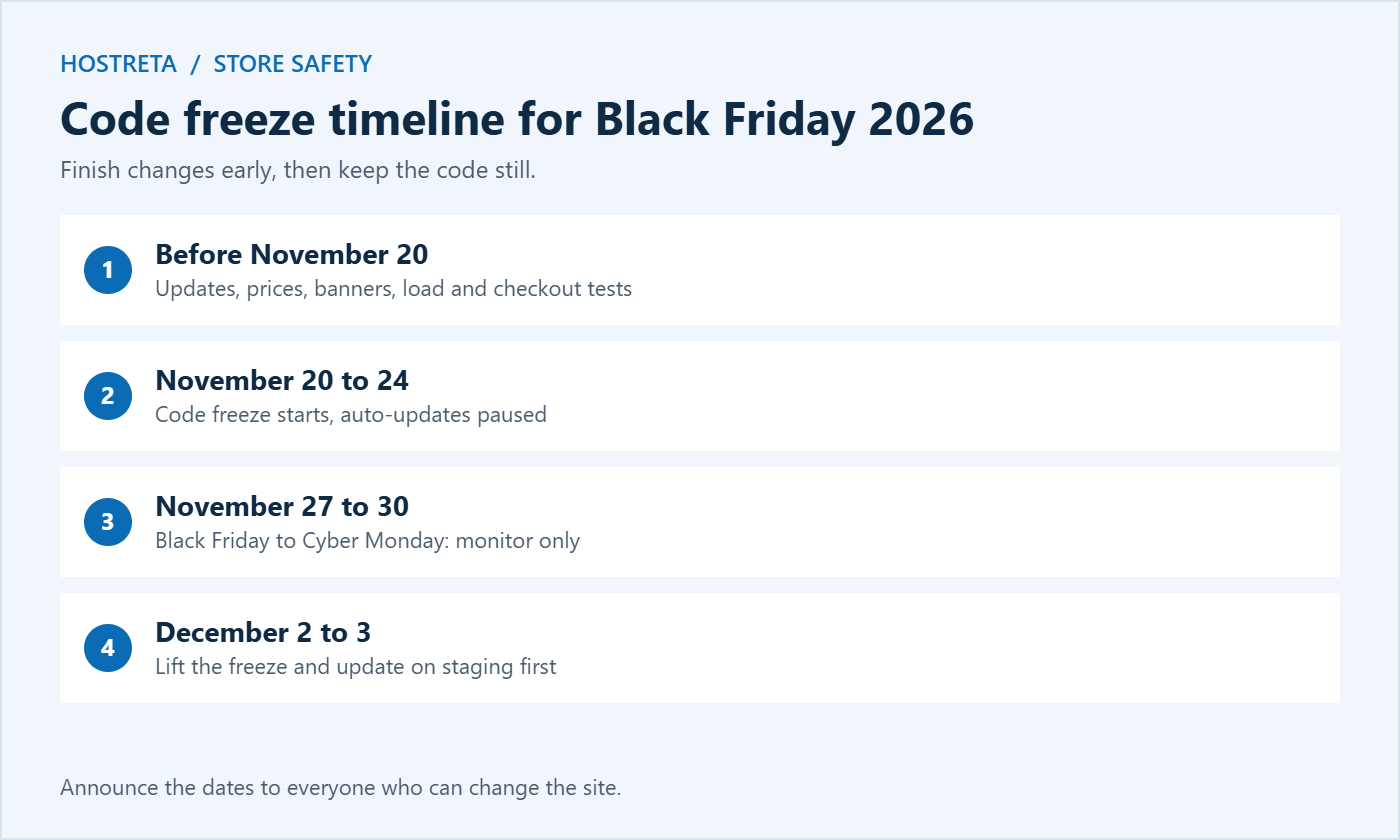
This guide is updated for the 2026 holiday season, with Black Friday on November 27 and Cyber Monday on November 30. It explains what a code freeze means, when to start yours, what to finish beforehand, how to stop automatic updates, what’s allowed during the freeze, how to handle emergencies, and how to lift it safely afterwards.
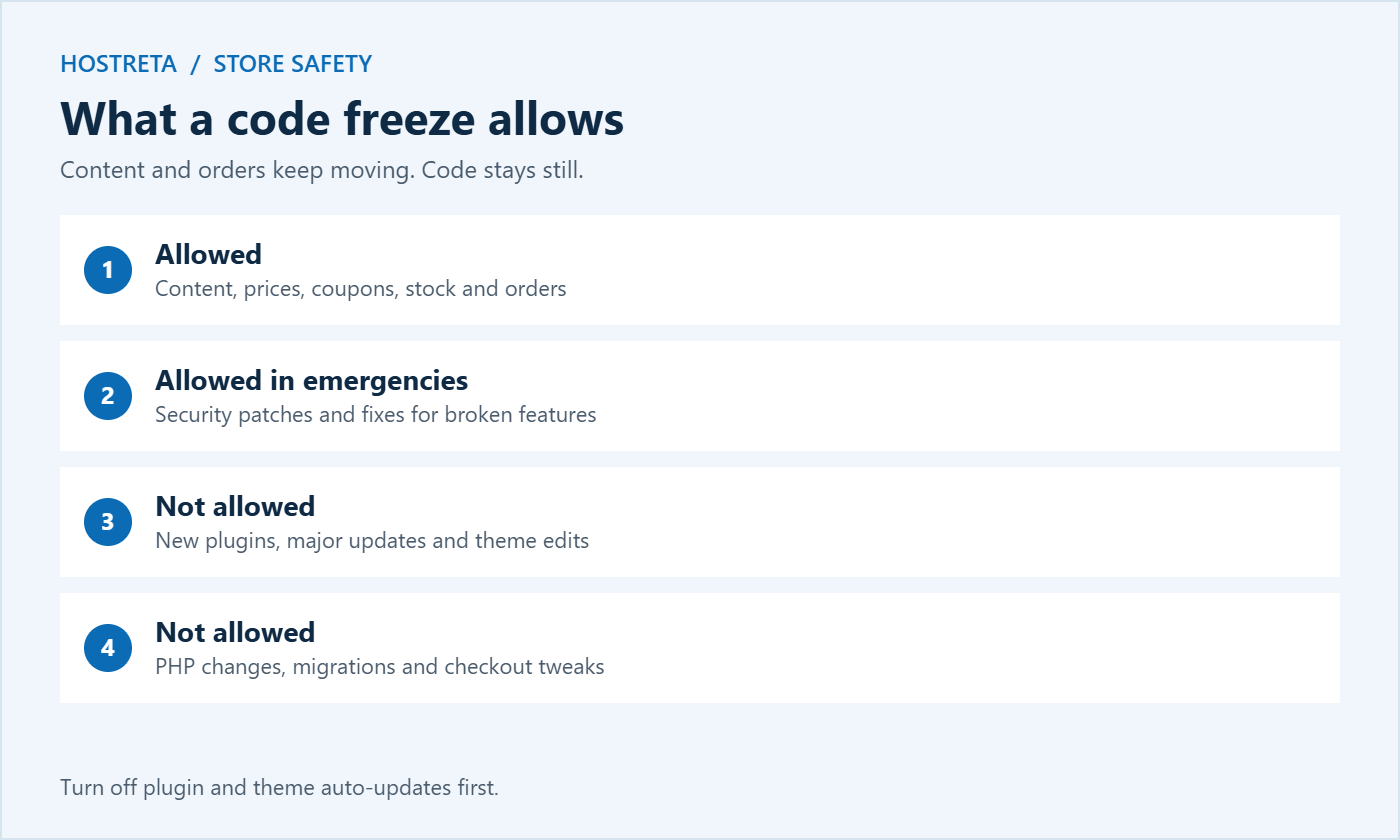
A code freeze pauses non-essential changes to the site: no plugin or theme updates, no new plugins, no redesigns, no PHP version changes, no payment gateway swaps, and no server migrations.
It isn’t about stopping work — it’s about making sure every change happens when you have time to test and fix it, rather than during the hours when every minute of downtime costs money. Content, prices, and orders keep moving; the code underneath them stays still.
WordPress stores depend on dozens of plugins from different developers, each updating on its own schedule. WooCommerce itself releases new versions regularly, and many extensions update in response. Any one of these updates can conflict with your theme, checkout, or payment gateway. A code freeze removes that risk during the days when you can least afford it.
Since WordPress 5.5, plugins and themes can update automatically, and many hosts also apply updates for you. During a code freeze, these automatic updates defeat the purpose. Before the freeze begins:
Write down every setting you change so you can turn auto-updates back on when the freeze ends.
A freeze shouldn’t stop you running a sale. Usually allowed:
Not allowed: new plugins, major updates, theme edits, server migrations, and “small tweaks” to checkout.
Independent backups and monitoring make emergencies far less stressful. CodeGuard keeps daily off-site backups, SiteLock scans for malware, and 360 Monitoring alerts you the moment something goes down.
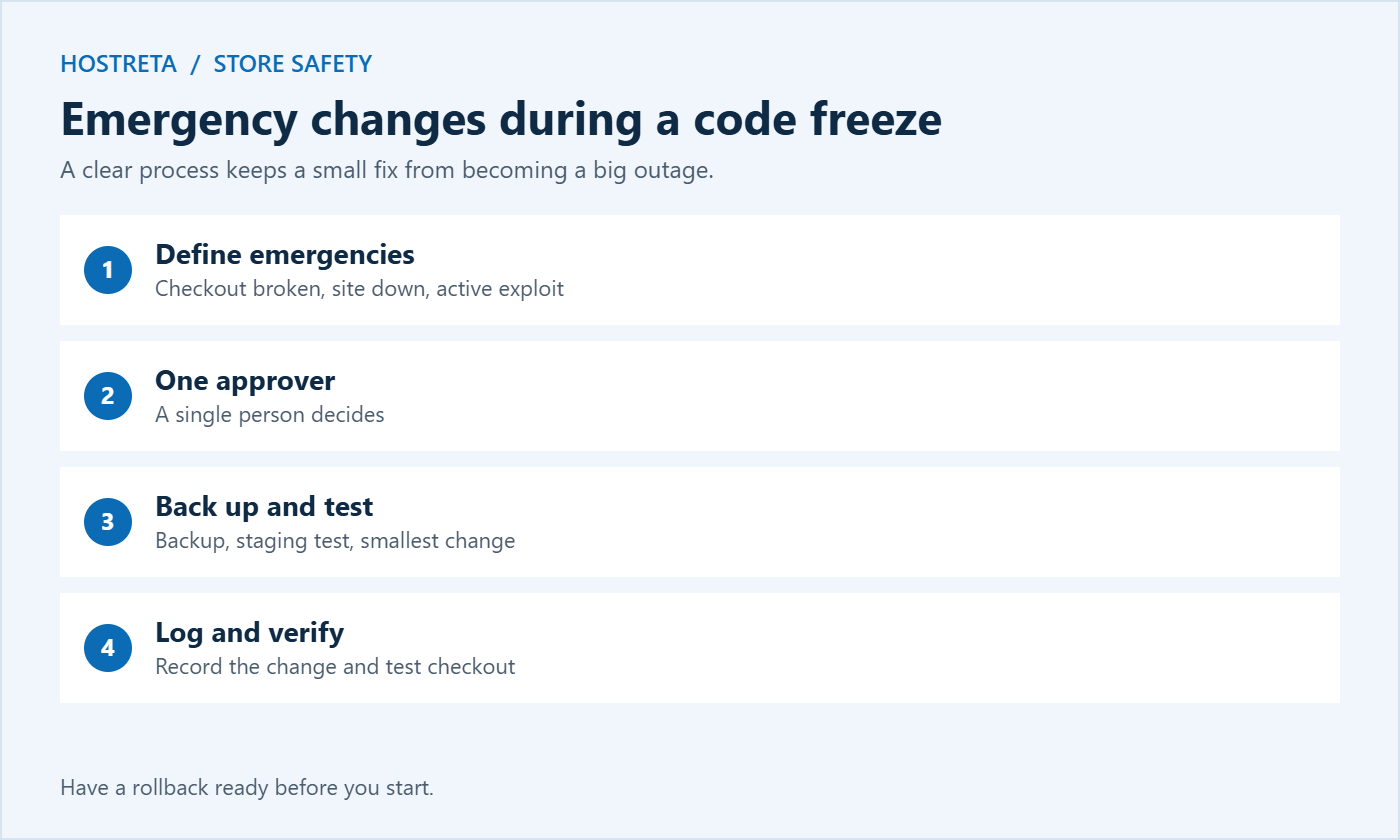
A short written policy turns good intentions into a plan everyone follows. It doesn’t need to be long — one page is enough. Include:
Share the policy with everyone who has admin access, including freelancers and agencies, and ask them to confirm they’ve read it.
During a code freeze, fewer people with full access means fewer accidental changes. Temporarily reduce admin accounts to the minimum, give content editors only the roles they need, and remove access for anyone who doesn’t need it during the sale — see WordPress User Roles and Permissions Explained. Keep two-factor authentication on for every remaining admin.
A freeze reduces risk, but problems can still come from outside: a payment provider outage, a hosting issue, or a sudden traffic spike. Keep a close eye on the store throughout the sale period:
Stable hosting makes the freeze much calmer. Kawedma WordPress hosting and managed WordPress hosting powered by Rocket.net include staging and backups, while a Kawedma VPS server or managed VPS gives busy stores guaranteed resources.
If you manage several client stores, a coordinated code freeze protects everyone. Agree dates with each client in October, add them to a shared calendar, and pause your own deployment pipelines or scheduled maintenance during the window. Tell clients exactly what’s allowed — content and prices — and what isn’t, so they don’t ask for redesigns the week of Black Friday.
Prepare a short status message for each client before the freeze: what was updated, when the last backup was taken, how to reach you during the sale, and what counts as an emergency. After the sale, schedule updates client by client on staging rather than all at once. Clear communication makes the busiest week of the year calmer for you and your clients. Hosting that keeps each client separate, such as Kawedma reseller hosting or reseller hosting from Hosting.com, also limits the damage if one site has a problem. More on managing client sites is in Hosting for Agencies: Managing Multiple Client Sites.
The same approach helps whenever a big moment depends on your site working perfectly: product launches, TV or press coverage, large paid campaigns, Christmas delivery deadlines, and seasonal peaks specific to your industry. Some stores run a shorter “soft freeze” before every major email campaign, pausing updates for a day before and after. Over time, the habit of finishing changes early and testing properly makes every launch smoother.
After every freeze, ask three questions: Did anything break despite the freeze? Did we need any emergency changes, and were they handled well? What should we finish earlier next time? Keep the answers with your policy. Each year, your code freeze becomes shorter, calmer, and more effective because the preparation improves. Store the notes with your other maintenance records — see Website Maintenance: 7 Essential, Safe Monthly Checks.
Imagine a small fashion store preparing for Black Friday. In early November, the owner updates WordPress, WooCommerce, and all plugins on staging, tests checkout, and applies the updates to the live store. Sale prices are scheduled, the countdown banner is added, and a load test confirms the hosting can handle three times normal traffic. On November 21, the owner takes a full backup, turns off auto-updates, removes an old freelancer’s admin account, and emails the team: “Code freeze until December 2. Content and prices only.”
On Black Friday morning, a plugin developer releases a new version with “performance improvements.” Without the freeze, it might have installed automatically. Instead, it waits. On Saturday, a payment provider has a brief outage; monitoring alerts the owner, who confirms the problem is external and posts a short update on social media rather than changing anything on the site. On December 2, the owner applies the pending updates on staging, tests checkout, and rolls them out to the live store. The sale passes without a single self-inflicted outage.
That’s the goal of a code freeze: not zero problems, but no problems you caused yourself at the worst possible moment.
For most small stores, from three to seven days before Black Friday until two or three days after Cyber Monday — roughly one to two weeks in total.
Yes. Prices, coupons, stock, and content are normal store operations. The freeze covers code, plugins, themes, and server settings.
If it fixes an actively exploited vulnerability in a plugin you use, apply it following your emergency process: backup, staging test, update, and checkout test.
Yes. It’s even more important when there’s nobody else to fix problems quickly during the sale.
Usually not. Content, prices, and banners are part of running a sale. Just avoid content changes that rely on new plugins or theme edits.
Minor WordPress security releases are designed to be safe and are often applied automatically. If one arrives during the freeze, check the release notes, back up, and apply it after testing checkout on staging if possible.
It’s better not to. New payment methods involve plugins, settings, and checkout changes. Add them before the freeze and test them thoroughly.
Explain the cost of downtime during the sale, share the written policy, name an approver, and make the emergency process easy to follow. Most people are happy to wait a week once they understand why.
A code freeze is one of the cheapest forms of insurance an online store can buy. It costs nothing except a little planning: finish your updates early, test everything, take a backup, pause automatic updates, and agree on how to handle the rare real emergency. In return, you protect the days that matter most from avoidable mistakes and give yourself the calm to focus on customers, orders, and marketing.
When the rush is over, lift the freeze gradually, apply updates on staging first, and write down what you learned. Add the dates to next year’s calendar now, and each holiday season will start from a stronger, more prepared position than the last. Your customers will never know the freeze existed; they will simply experience a store that works when they want to buy.
Your host may still perform maintenance on servers during your freeze. Ask in advance whether any planned maintenance, PHP upgrades, or migrations are scheduled during your sale period, and request that changes to your account are postponed until afterwards. Many hosts will accommodate this if you ask early, and some publish a holiday change freeze of their own for exactly this reason. Note their emergency contact details alongside your own freeze policy so you can reach the right people quickly.
Pick your freeze dates today and put them in the calendar for everyone who works on the site. Then use the days before the freeze to finish updates, schedule prices, run your load and checkout tests, and take a verified backup. When the freeze begins, you will be able to watch the sale unfold with confidence instead of worry.
Stability during your busiest days is worth far more than any small improvement you could make during that week. Plan the work, finish it early, and protect the sale.
Your future self, busy with orders on Black Friday morning, will thank you.
Freeze early, sell calmly.
We may earn a commission on purchases made through these links, at no extra cost to you.
Don’t miss the chance to participate in the biggest giveaway of this year.